
I tested 10 leading stock screeners to find the best tools for technical traders, day traders, and long-term investors. TradingView scores highest overall at 4.67, while TrendSpider excels at technical scanning, Stock Rover at fundamental screening, and Trade Ideas at real-time day-trading scans.
The best stock screener depends heavily on how you trade. A long-term investor screening hundreds of financial metrics has very different requirements from a day trader searching for unusual volume or a technical trader scanning for chart patterns.
That is why I do not rank these tools solely on their overall software ratings. For this comparison, I created a dedicated LST Screener Score using six screening-related metrics from our 2026 version 3 lab tests.
Top 10 Stock Screeners Ranked
| Stock Screener | Rank | Screener Score | Best For | Free Version |
|---|---|---|---|---|
| TradingView | 1 | 4.67 | Free & global stock screening | Yes |
| TrendSpider | 2 | 4.62 | Technical stock screening | Trial |
| Stock Rover | 3 | 4.47 | Fundamental screening | Yes |
| Trade Ideas | 4 | 4.08 | Real-time day-trading scans | Yes |
| Optuma | 5 | 3.87 | Professional technical scanning | Trial |
| Portfolio123 | 6 | 3.82 | Quant & fundamental screening | Trial/access offer |
| TC2000 | 7 | 3.67 | US stocks & options scanning | No |
| MetaStock | 8 | 3.64 | Global technical scanning | No |
| Tickeron | 9 | 2.85 | AI pattern screening | Limited/trial |
| Finviz | 10 | 2.67 | Simple free stock screening | Yes |
My Test Results
TradingView ranks first with a 4.67 Screener Score. Its combination of powerful stock screening, excellent usability, global market coverage, alerts, backtesting, and a useful free version makes it the strongest all-round result in my test.
TrendSpider is extremely close at 4.62 and is my preferred choice for advanced technical scanning. Its strengths include multi-factor technical scans, pattern recognition, backtesting, alerts, and automation.
Stock Rover scores 4.47 and is my top choice for fundamental investors. Its 5.00 scanning result reflects exceptional depth for screening companies using financial, valuation, growth, profitability, dividend, and portfolio criteria.
Trade Ideas scores 4.08 and is my top choice for US day traders. It is built primarily for active US stock traders who need fast, real-time market scanning, alerts, AI-generated ideas, and strategy testing.
The lower-ranked products should not automatically be dismissed. Finviz, for example, scores only 2.67 under my complete methodology but remains one of the easiest free stock screeners to use. Portfolio123 scores 3.82 overall but offers sophisticated fundamental screening and historical testing that may make it a better choice for quantitative investors than several higher-ranked products.
The score, therefore, tells you how each product performed on my standardized test. The Best For designation tells you where I think each screener’s particular strengths are most useful.
How I Test Stock Screeners
I have tested trading and investing software for over a decade. One problem with comparing stock screeners is that they are often rated as complete trading platforms rather than on their actual screening capabilities.
For this comparison, I use a dedicated LST Screener Score calculated from six metrics in my 2026 software lab tests.
| Test Category | Weight | What I Measure |
|---|---|---|
| Scanning Performance | 50% | Screening depth, flexibility, speed, criteria, and customization |
| Speed & Ease of Use | 15% | How quickly users can build, modify, and run screens |
| Value Score | 15% | Functionality delivered relative to cost |
| Backtesting Performance | 10% | Ability to test screening or trading ideas historically |
| Alert Speed | 5% | How effectively the platform monitors and reports qualifying conditions |
| AI & Algo Capability | 5% | AI, algorithms, automation, and intelligent screening functionality |
| Total | 100% | Weighted LST Screener Score |
Scanning Performance carries 50% of the final score because this article is specifically about stock screeners. Features such as community, news, broker connectivity, portfolio management, and customer support are important when evaluating an entire trading platform. Still, they should not determine which product has the best stock screener.
Screener vs. Scanner: What’s the Difference?
Stock screeners and stock scanners perform similar jobs, but there is an important distinction.
A stock screener filters a universe of stocks according to specified criteria. An investor might screen for companies with a P/E ratio below 20, revenue growth above 10%, a dividend yield above 3%, or a particular technical condition.
A stock scanner generally monitors market data more continuously, looking for stocks that meet conditions as the market changes. This is particularly important for day traders searching for events such as volume spikes, breakouts, gaps, or rapid price movements.
The distinction has become less clear because many modern platforms now perform both functions. Throughout this comparison, I use stock screener as the broader category while identifying products particularly suited to real-time scanning.
Best Free Stock Screeners
You do not necessarily need to pay for a stock screener. Several of the products I tested provide genuinely useful free screening tools, although free versions usually have restrictions on real-time data, advanced filters, alerts, or historical testing.
| Free Stock Screener | Best For | Key Strength | Main Limitation |
|---|---|---|---|
| TradingView | Best free overall | Technical + fundamental screening with broad global coverage | Some data and advanced functionality require paid plans |
| Stock Rover | Best free for investors | Fundamental and financial screening | Primarily designed for investors rather than active traders |
| Finviz | Best simple free screener | Fast, easy US stock filtering and visualization | Real-time data and advanced functionality require Elite |
TradingView is my top free stock screener overall because its free platform combines technical and fundamental filtering with unusually broad international market coverage.
Stock Rover is the stronger choice for fundamental investors who care about company financials, valuation, growth, dividends, and portfolio research.
Finviz remains one of the easiest free screeners for quickly filtering US stocks. Its interface makes it particularly useful for beginners, but real-time data and more advanced functionality require Finviz Elite.
Which Stock Screener Should You Choose?
Rather than choosing solely from the overall ranking, I would match the software to the type of screening you actually need:
| If You Need… | My Pick |
|---|---|
| Best overall/free/global screener | TradingView |
| Advanced technical scanning | TrendSpider |
| Fundamental investing screens | Stock Rover |
| Real-time day-trading scans | Trade Ideas |
| Professional technical analysis | Optuma |
| Quantitative fundamental research | Portfolio123 |
| US stocks and options scanning | TC2000 |
| Global technical analysis | MetaStock |
| AI pattern screening | Tickeron |
| Simple free US stock screening | Finviz |
The important point is that no single screening workflow suits everyone.
TradingView produces the highest overall Screener Score in my testing. Still, Stock Rover is substantially better suited to deep fundamental screening, while Trade Ideas is purpose-built for real-time active trading.
1. TradingView: Best Free & Global Stock Screener
TradingView ranks first in my stock screener test with a weighted score of 4.67. I recommend it as the best all-round choice for traders who want technical and fundamental screening across global markets, particularly because useful screening is available on the free plan.
TradingView Screener Test Results
| Test | Score | Weight | Weighted Score |
|---|---|---|---|
| Scanning Performance | 4.83 | 50% | 2.42 |
| Speed & Ease of Use | 5.00 | 15% | 0.75 |
| Value | 4.37 | 15% | 0.66 |
| Backtesting | 4.19 | 10% | 0.42 |
| Alert Speed | 4.67 | 5% | 0.23 |
| AI & Algo | 4.00 | 5% | 0.20 |
| TradingView Screener Score | 100% | 4.67 |
TradingView combines stock screening with excellent charting, technical analysis, alerts, and strategy testing. This makes it particularly useful when you want to move directly from finding a stock to analyzing its chart without switching platforms.
Its biggest advantage over many competitors is market coverage. TradingView’s stock screener covers 70+ markets across more than 50 countries, making it a much stronger choice for international screening than US-focused tools such as Finviz, Trade Ideas, or TC2000.
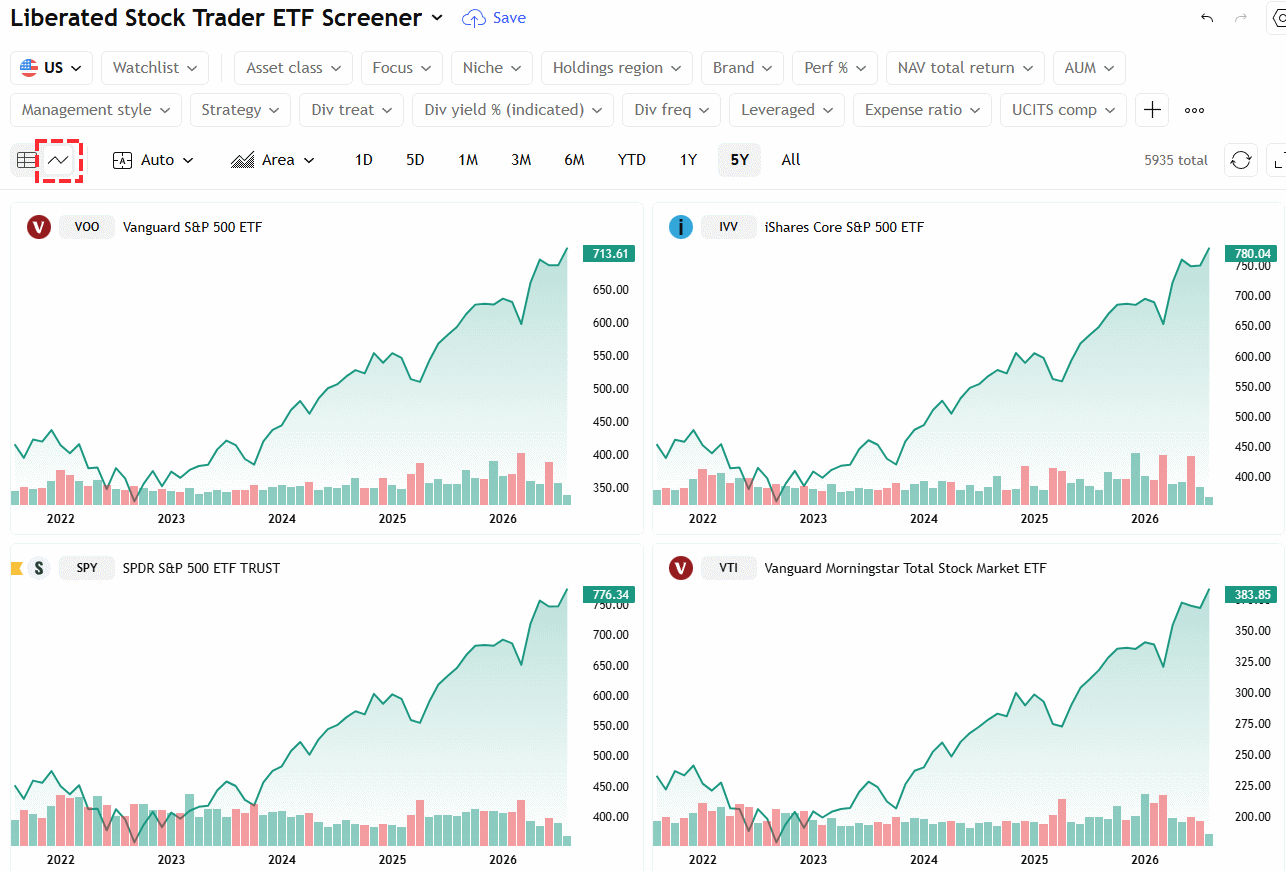
TradingView recently released its AI-powered screening. In my testing, it works very well. Below you can see I typed “Stocks with high Alpha,” and it automatically applied the correct filter and changed the view and columns to show me the top stocks currently outperforming the market.

| ⚡ TradingView Features | Charts, News, Watchlists, Screening, Chart Pattern & Candlestick Recognition, Full Broker Integration |
| 🏆 Unique Features | Trading, Backtesting, Community, Global Stock, FX & Crypto Markets, Webhook Bot Integration |
| 🎯 Best for | Stock, FX & Crypto Traders |
| ♲ Subscription | Monthly, Yearly |
| 💰 Price | $0 | $15 | $35 | $70 See Pricing Guide |
| 🆓 Free | ✔ |
| 💻 OS | Web Browser|PC|IOS|Android |
| 🎮 Trial | Yes, Free 30-Day Premium |
| ✂ Discount | -17% on yearly plan + $15 Discount |
| 🌎 Region | Global |
What I Like About TradingView’s Screener
5.00 Excellent usability: TradingView makes it unusually easy to create, change, and analyze screens without a steep learning curve.
4.83 Powerful technical and fundamental screening: You can combine price, volume, technical indicators, valuation, profitability, growth, dividends, and other company data to narrow the market.
5.00 Global market coverage: This is one of TradingView’s biggest competitive advantages. If you screen stocks outside the United States, it is considerably more versatile than most products in this comparison. Also, the new macro maps feature combines over 500 economic indicators onto a heatmap, so you can screen at a country level.

4.00 AI screening is improving: TradingView’s newer AI Screener lets users describe the stocks they want in natural language and converts the request into screening filters. I view this as a useful interface improvement rather than an AI stock-picking system.
Useful free version: Unlike many professional scanners, this one lets you perform meaningful stock screening without having to buy a subscription first.
Where TradingView Falls Short
TradingView is an excellent general-purpose screener, but it is not the strongest product for every type of screening.
For extremely deep fundamental research, I prefer Stock Rover. Investors who want hundreds of financial metrics, detailed valuation analysis, and portfolio research will find Stock Rover more specialized.
For advanced automated technical scanning, TrendSpider has stronger specialist functionality, while Trade Ideas is more focused on rapidly changing real-time conditions for US day traders.
Some exchange data and advanced functionality also require paid subscriptions or additional market-data packages, so “free” does not mean that every TradingView feature or every real-time exchange feed costs nothing.
Who Should Use TradingView?
I recommend TradingView for traders and investors who want a single screener that covers technical and fundamental criteria across US and international markets.
It is particularly compelling for beginners because you can start free, but its charting, Pine Script, alerts, backtesting, and screening capabilities also give experienced traders considerable room to expand.
Best for: Global stocks, technical screening, general-purpose screening, and traders wanting a strong free starting point.
Not best for: Extremely deep fundamental analysis or specialist real-time US day-trading scans.
Read my complete TradingView review for the full 58-point lab test, or compare the available plans in my TradingView pricing guide.
2. TrendSpider: Best Technical Stock Screener
TrendSpider ranks second in my stock screener test with a weighted score of 4.62. It is my top choice for technical stock screening because it combines powerful multi-factor scans with automated technical analysis, alerts, and industry-leading backtesting.
While TradingView wins overall by a narrow margin, TrendSpider is more specialized. Its Market Scanner is designed for traders who want to search for specific technical conditions and then test, monitor, and act on those setups from the same platform.
This makes TrendSpider particularly strong for swing traders and systematic technical traders rather than investors primarily screening company fundamentals.
TrendSpider Screener Test Results
| Test | Score | Weight | Weighted Score |
|---|---|---|---|
| Scanning Performance | 4.67 | 50% | 2.33 |
| Speed & Ease of Use | 4.67 | 15% | 0.70 |
| Value | 4.20 | 15% | 0.63 |
| Backtesting | 4.88 | 10% | 0.49 |
| Alert Speed | 4.33 | 5% | 0.22 |
| AI & Algo | 5.00 | 5% | 0.25 |
| TrendSpider Screener Score | 100% | 4.62 |
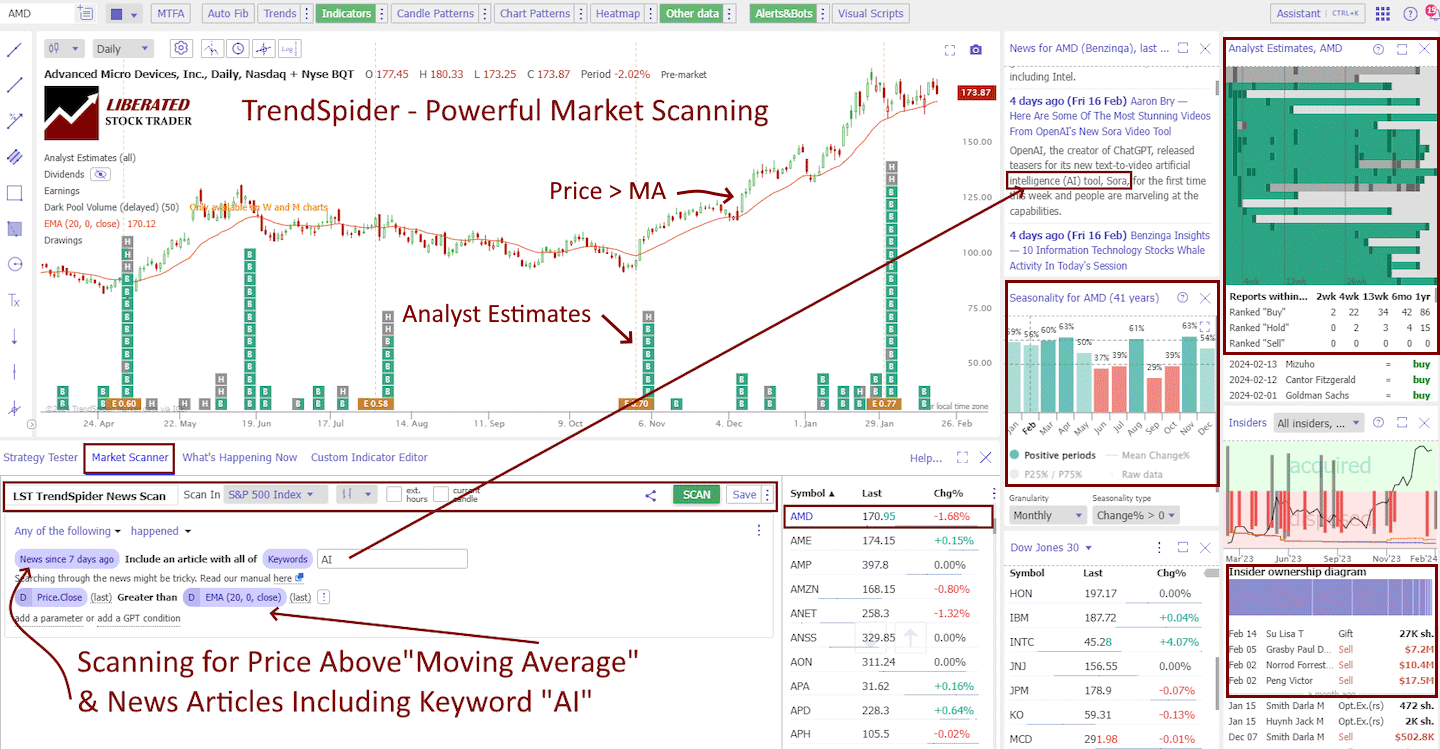
In the screenshot above, I have captured the essentials for running a market scanner across the S&P 500, searching for stocks in an uptrend that have a news announcement mentioning “AI.”
TrendSpider stands out as an industry leader for its powerful multilayer approach to screening financials, technicals, news, and analyst reports. It even includes data on dark pools and insider trading, all of which can be overlaid on the chart.
| ⚡ Features | Charts, Watchlists, Screening, Free Real-time Data |
| 🏆 Unique Features | AI-Automated Trendlines, Fibonacci, Candlestick Pattern Recognition, Auto-Bot Trading, Code-free, Powerful Backtesting, Launch and Train Personal AI Models with ML Quant Lab. |
| 🎯 Best for | Stock, Options, FX & Crypto Traders |
| ♲ Subscription | Monthly, Yearly |
| 💰 Price | $54 | $214 |
| 💻 OS | Web Browser |
| 🎮 Trial | 14-Day Trial |
| ✂ Discount | Code "LST30" for 30% to 63% Off |
| 🌎 Region | USA |
Save Up to 48% on TrendSpider
⭐ Our Top Rated AI & Automated Trading Tool
✅ + 2 Months of SideKick AI worth $258
✅ AI Benchmark Winner
Deal Ends In:
What I Like About TrendSpider’s Scanner
4.67 Advanced technical screening: TrendSpider lets me combine multiple technical conditions rather than simply filtering stocks by a handful of indicators. This is particularly useful for finding specific trading setups across a large universe of securities.
4.88 Excellent backtesting: One of TrendSpider’s biggest advantages is the connection between scanning and strategy testing. Instead of assuming that a screening condition identifies a profitable setup, I can test the underlying rules against historical data.
5.00 Strong AI and automation: TrendSpider combines its scanner with automated technical analysis and increasingly sophisticated AI tools. These can reduce the amount of manual chart analysis required. TrendSpider also includes an AI Assistant called Sidekick that lets you type freely what you want to screen for, or research in plain English. The assistant will then set up the screen or backtest for you.
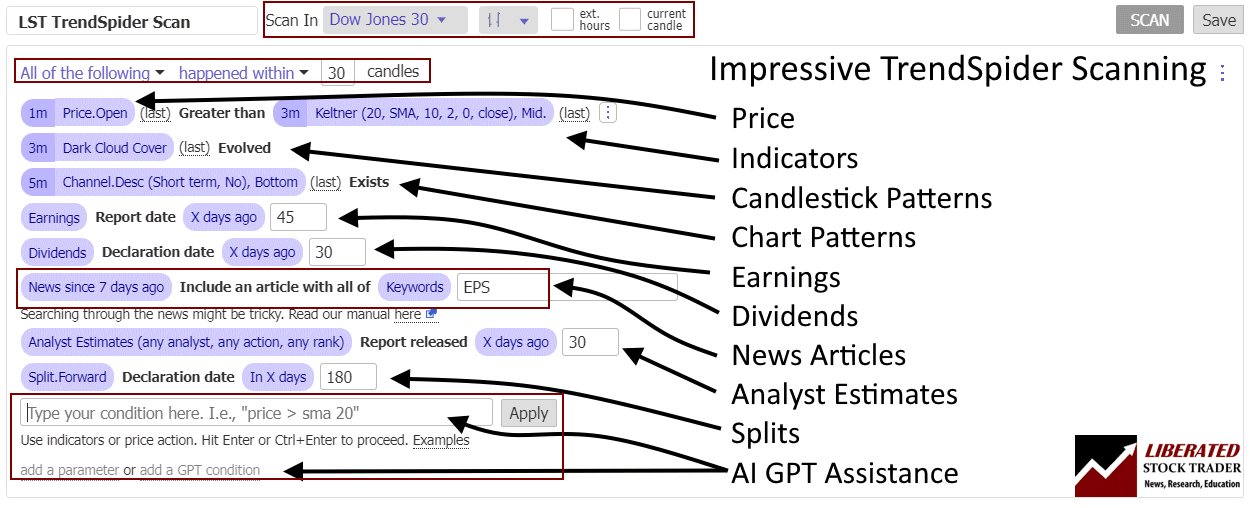
Technical and fundamental criteria: Although I primarily recommend TrendSpider for technical traders, its scanner can combine technical conditions with fundamental criteria. That makes it possible to build more selective screens rather than relying on price action alone.
Alerts extend the scanner: Once I identify a setup, TrendSpider’s alerts can continue monitoring the market for those conditions. This is much more useful than repeatedly rerunning the same screen manually.
Where TrendSpider Falls Short
TrendSpider does not have TradingView’s breadth of international stock-market coverage, so TradingView remains my preferred screener for traders searching global equity markets.
It is also not my first choice for deep fundamental stock selection. Stock Rover provides substantially greater financial-analysis depth for long-term investors screening companies by valuation, profitability, growth, dividends, and other fundamental factors.
The other significant difference is price. TradingView, Stock Rover, and Finviz all provide usable permanent free options. TrendSpider is a premium product, so its advanced scanning and testing capabilities need to justify the subscription cost for your trading process.
Who Should Use TrendSpider?
I recommend TrendSpider primarily for technical and swing traders who want to turn defined trading rules into repeatable market scans.
Its combination of screening, automated technical analysis, alerts, and backtesting is particularly useful if your process sounds like:
Find every stock meeting these technical conditions, test whether the setup has historically worked, and alert me when the conditions appear again.
That is a fundamentally different requirement from simply finding inexpensive stocks with strong earnings growth.
Best for: Technical screening, swing trading, multi-condition scans, backtesting, alerts, and systematic trading workflows.
Not best for: Deep fundamental research, investors needing a permanent free plan, or traders whose priority is broad international stock coverage.
Read my complete [TrendSpider review] for the full 58-point hands-on test and detailed analysis of its scanning, backtesting, AI, alerts, and automation capabilities.
Read the TrendSpider Hands-On Test
3. Stock Rover: Best Fundamental Stock Screener
Stock Rover ranks third in my stock screener test with a weighted score of 4.47. It is my top choice for fundamental stock screening because it combines exceptional financial-data depth with powerful filtering, research, portfolio analysis, and historical testing.
Stock Rover is very different from TrendSpider or Trade Ideas. It is designed primarily for investors rather than short-term traders. Instead of concentrating on rapidly changing intraday conditions, Stock Rover excels at finding companies based on valuation, growth, profitability, dividends, financial strength, analyst estimates, and other fundamental characteristics.
In my testing, Stock Rover achieved a 5.00 Scanning Performance score, the highest possible result.
Stock Rover Screener Test Results
| Score | Rating | Weight | Weighted Score |
|---|---|---|---|
| Scanning Performance | 5.00 | 50% | 2.50 |
| Speed & Ease of Use | 5.00 | 15% | 0.75 |
| Value | 3.63 | 15% | 0.54 |
| Backtesting | 4.00 | 10% | 0.40 |
| Alert Speed | 3.00 | 5% | 0.15 |
| AI & Algo | 2.50 | 5% | 0.13 |
| Stock Rover Screener Score | 100% | 4.47 |

| ⚡ Stock Rover Features? | Charts, News, Watchlists, Broker Integration |
| 🏆 Exceptional Features? | Financial Screening, Portfolio Mgt & Rebalancing, 20-Year Financial Database |
| 🎯 Best for | Growth, Dividend & Value Investors |
| ♲ Subscription | Monthly, Yearly |
| 🆓 Free | ✔ |
| 💰 Price | $0 | $29 | $49 |
| 💻 OS | Web Browser |
| 🎮 Trial | 14-Day |
| ✂ Discount Code | -25% During Premium Trial Period |
| 🌎 Region | USA |
What I Like About Stock Rover’s Screener
5.00 Outstanding fundamental screening: Stock Rover provides hundreds of financial and investment metrics covering valuation, profitability, growth, dividends, financial strength, analyst estimates, earnings, cash flow, and many other factors.
This makes it possible to build detailed screens such as:
- Profitable companies with rising revenue and earnings
- Dividend stocks with sustainable payout ratios
- Undervalued companies with strong balance sheets
- Growth stocks with improving margins
- High-quality companies trading below historical valuations
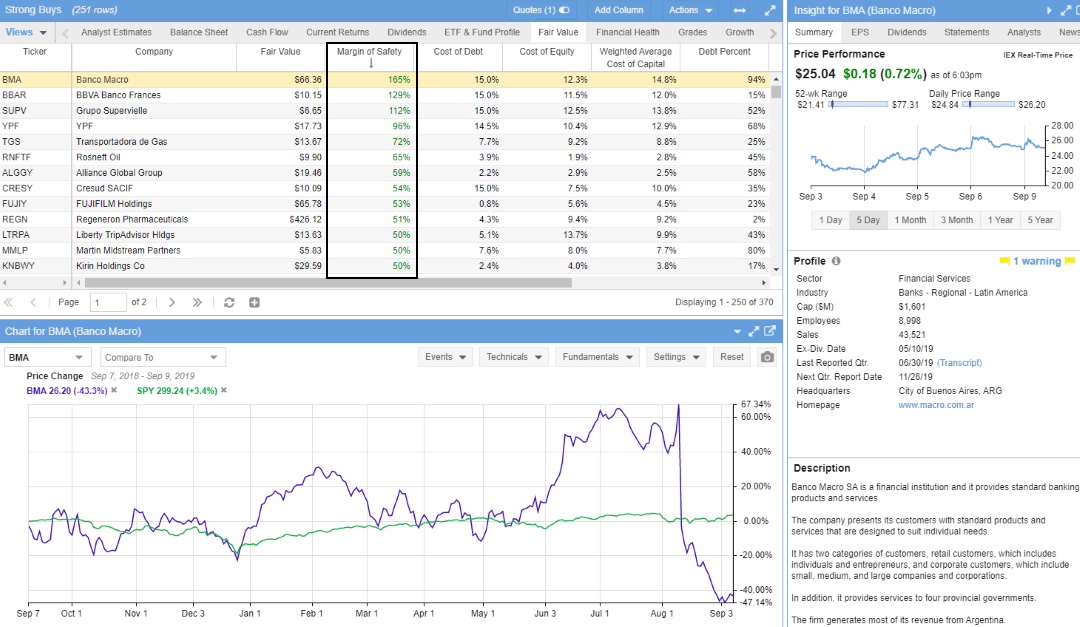
5.00 Fast and easy to use: Despite the depth of available data, Stock Rover makes building and modifying screens relatively straightforward. Investors can start with predefined screeners or construct their own rules.
Excellent predefined screening strategies: Stock Rover includes ready-made screeners for common investing approaches, including value, growth, quality, dividends, and financial strength. These provide a useful starting point before creating custom screens.
4.00 Historical testing adds context: Screening criteria can be evaluated historically, helping investors determine whether a particular combination of factors has actually identified stronger stocks in the past rather than simply looking attractive today.
Screening connects directly to research: Once I find a company, I can immediately investigate its financial statements, valuation, ratios, historical performance, analyst estimates, and portfolio impact without switching platforms.
Where Stock Rover Falls Short
Stock Rover is not designed as a high-speed intraday market scanner.
If I wanted to find stocks breaking resistance on unusual volume during the trading session, I would choose Trade Ideas or TrendSpider rather than Stock Rover.
Technical screening is also not its primary strength. Stock Rover includes technical criteria, but traders whose strategies depend heavily on indicators, chart patterns, price action, or complex technical combinations will find TradingView and TrendSpider more capable.
Its AI capabilities are comparatively limited, reflected in its 2.50/5 AI & Algo score. This matters much less for fundamental investors than it would for traders specifically seeking AI-assisted scanning or automation.
Free vs. Paid Stock Rover Screening
Stock Rover offers a permanent free version, making it one of the strongest free choices in this comparison for long-term investors.
The free plan provides useful screening and research functionality, but the deeper financial datasets and more advanced screening capabilities are available in the paid tiers.
This is an important distinction from tools offering only a temporary free trial: Stock Rover can genuinely be used as an ongoing free stock screener.
Who Should Use Stock Rover?
I recommend Stock Rover for long-term investors who select stocks using company fundamentals rather than short-term price movements.
It is particularly strong for:
- Value investors
- Dividend investors
- Growth investors
- Quality-factor investors
- Portfolio managers
- Investors building multi-factor screening strategies
If your question is:
“Which companies have the financial characteristics I want?”
Stock Rover is arguably the strongest tool in this test.
If your question is:
“Which stocks are breaking out right now?”
then TrendSpider or Trade Ideas is the better choice.
Best for: Fundamental screening, value investing, dividend investing, growth stocks, financial research, and portfolio analysis.
Not best for: intraday scanning, sophisticated technical pattern screening, or AI-driven trading workflows.
Read my complete Stock Rover review for the full 58-point test and detailed assessment of its screening, research, portfolio, and financial analysis capabilities.
4. Trade Ideas: Best Real-Time Day-Trading Scanner
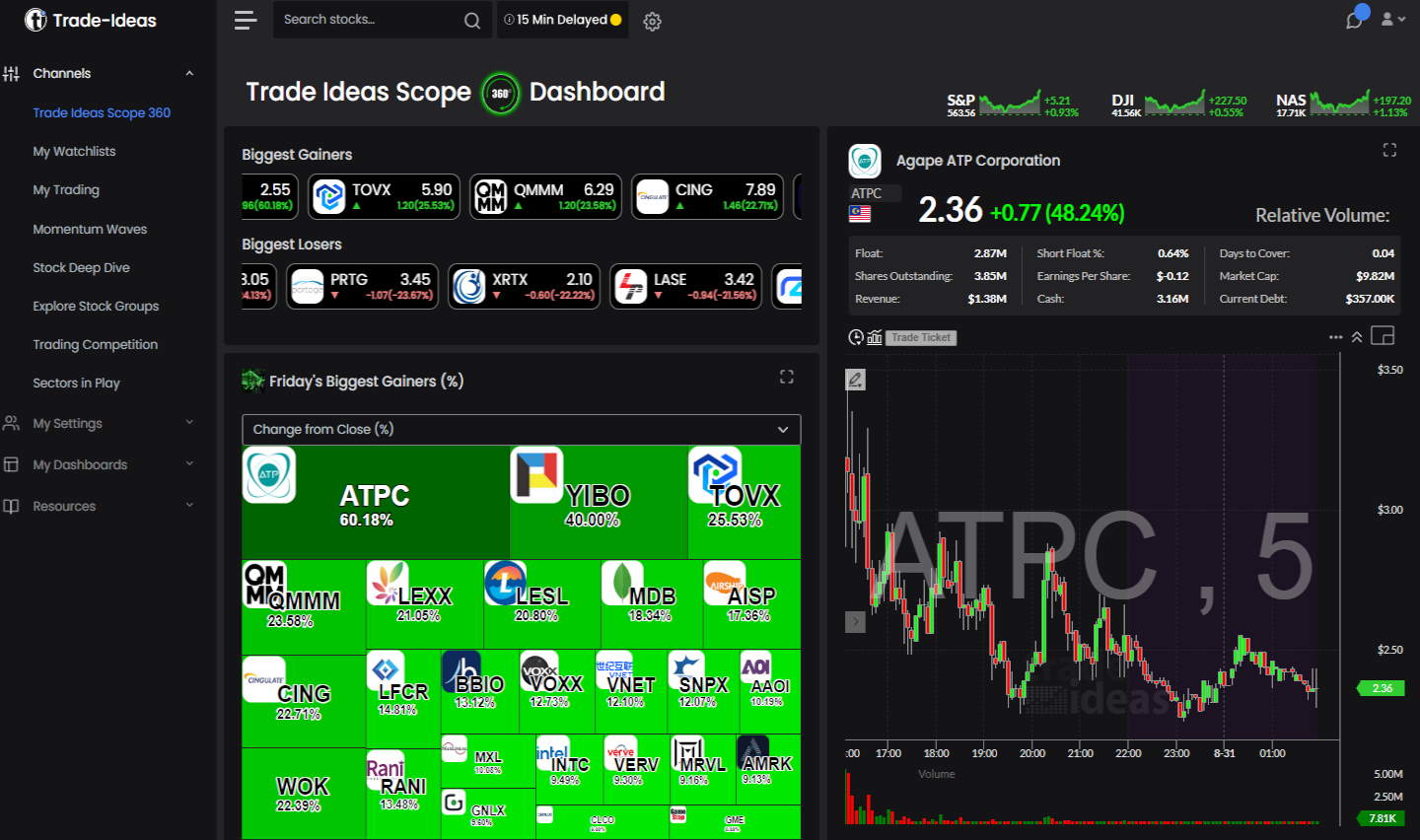
Trade Ideas ranks fourth in my stock screener test with a weighted score of 4.08. It is my top choice for active day traders who need fast, real-time US stock scanning, alerts, AI-generated ideas, and strategy testing.
Trade Ideas is less like a traditional investment screener and more like a live market opportunity engine. Its strength lies in continuously scanning the US stock market for changing conditions, such as price movements, unusual volume, breakouts, volatility, gaps, and momentum.
That makes it fundamentally different from Stock Rover. Stock Rover helps me answer which companies meet my investment criteria. Trade Ideas is designed to answer what is happening in the market right now.
Trade Ideas Screener Test Results
| Score | Rating | Weight | Weighted Score |
|---|---|---|---|
| Scanning Performance | 3.88 | 50% | 1.94 |
| Speed & Ease of Use | 4.50 | 15% | 0.68 |
| Value | 4.05 | 15% | 0.61 |
| Backtesting | 4.38 | 10% | 0.44 |
| Alert Speed | 4.00 | 5% | 0.20 |
| AI & Algo | 4.50 | 5% | 0.23 |
| Trade Ideas Screener Score | 100% | 4.08 |
| ⚡ Features | Charts, Watchlists, Screening |
| 🏆 Unique Features | AI Trade Signals, Trading Room, Trading Competitions |
| 🎯 Best for | Active US stock traders who use scans and alerts throughout the session |
| ♲ Subscription | Monthly, Yearly |
| 💰 Price* | $89 | $178 |
| 🆓 Free Version | ✔ |
| 💻 OS | Web Browser, PC |
| 🎮 Trial | Free Live Trading Room |
| ✂ Discount | -15% Discount Code "LIBERATED" |
| 🌎 Region | USA |
| Why choose Premium? | Holly AI, backtesting, and auto-trading capabilities |
*Price is the annual plan monthly equivalent
Save 28% on Trade Ideas Premium
Our 4.52 ⭐ #1 Rated AI Day Trading Tool
☆ Code "TITREAT28" ☆
Deal Ends In:
What I Like About Trade Ideas
Trade Ideas is the best AI day trading scanner because it has built an AI algorithm called “Holly AI.” Holly applies 70 different strategies to all the stocks on the US stock exchanges; 70 strategies multiplied by 8,000+ stocks means millions of backtests daily. Only strategies with a backtested win rate over 60% and an estimated risk-reward ratio of 2:1 will be suggested as potential trades the following day.

Real-time scanning is the core product. Trade Ideas continuously monitors US equities rather than requiring traders to repeatedly run static screens. This is exactly what active traders need when market conditions change rapidly.
4.50 Fast workflow: Trade Ideas performed strongly for speed and ease of use in my testing. Once a scanner is configured, it can surface opportunities quickly without constantly moving between separate tools.
4.50 Strong AI functionality: Holly AI analyzes market conditions and generates trading ideas using predefined strategies. I view Holly as an idea-generation and decision-support system rather than an automatic guarantee of profitable trades.
4.38 Useful strategy testing: Premium users can use OddsMaker to test scanning strategies historically. This is important because a scan that finds interesting-looking stocks does not necessarily identify a repeatable trading edge.
Excellent for alerts: Traders can build highly specific scans around price, volume, volatility, technical behavior, and market events, then monitor those conditions throughout the session.
Where Trade Ideas Falls Short
Trade Ideas is primarily focused on US equities, so it is not my recommendation for someone seeking broad international market screening.
It is also more expensive than general-purpose screeners. Investors who simply want to find financially strong or undervalued companies would get significantly better value from Stock Rover, TradingView, Finviz, or Portfolio123.
Fundamental screening is not its central strength either. Trade Ideas is designed primarily for active trading rather than long-term company analysis.
Who Should Use Trade Ideas?
I recommend Trade Ideas for active US day traders who need continuous market condition monitoring.
It is particularly useful for traders looking for:
- Momentum stocks
- Unusual volume
- Breakouts
- Gaps
- Volatility
- Rapid price movement
- Intraday technical setups
- AI-generated trading ideas
Best for: Real-time day trading, US stock scanning, momentum strategies, alerts, AI-assisted idea generation, and active traders.
Not best for: Long-term fundamental investing, international stocks, or investors looking for a free stock screener.
Read my complete Trade Ideas review for the full 58-point hands-on test.
5. Optuma: Best Professional Technical Scanner
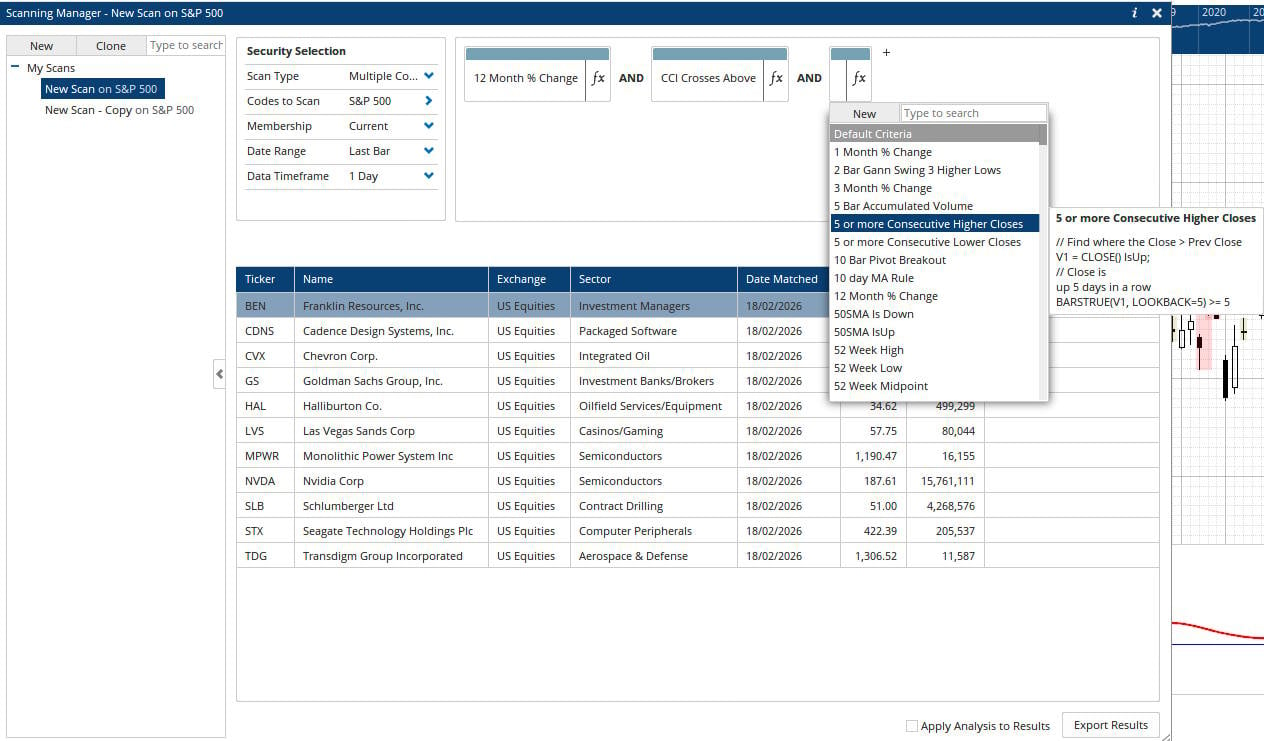
Optuma ranks fifth with a Screener Score of 3.87. I recommend it primarily for professional technical analysts who need sophisticated market scanning, quantitative analysis, charting, and historical strategy testing.
Optuma is considerably more specialized than most products in this comparison. It is closer to a professional technical analysis workstation than to a simple web-based stock screener.
Optuma Screener Test Results
| Score | Rating | Weight | Weighted Score |
|---|---|---|---|
| Scanning Performance | 4.05 | 50% | 2.03 |
| Speed & Ease of Use | 4.83 | 15% | 0.72 |
| Value | 2.53 | 15% | 0.38 |
| Backtesting | 4.94 | 10% | 0.49 |
| Alert Speed | 3.00 | 5% | 0.15 |
| AI & Algo | 2.00 | 5% | 0.10 |
| Optuma Screener Score | 100% | 3.87 |
Why Optuma Scores Well
4.05 Powerful scanning: Optuma can screen markets using sophisticated technical, quantitative, and fundamental rules.
4.94 Outstanding backtesting: Historical testing is one of Optuma’s strongest capabilities. Traders and analysts can evaluate whether technical conditions and systematic strategies have historically produced useful results.
4.83 Excellent platform performance: Despite its analytical depth, Optuma performed extremely well in responsiveness and usability during my lab testing.
Global and multi-asset analysis: Optuma is better suited than many US-centric screeners to professional users researching markets across different asset classes and geographic regions.
| ⚡ Features | Powerful Charts, Screening, Backtesting Fast |
| 🏆 Unique Features | Gann, Seasonality, Astrological Charts |
| 🎯 Best for | Technical Analysts |
| ♲ Subscription | Monthly, Yearly |
| 💰 Price/m | $150 | $300 | $630 |
| 💻 OS | Windows |
| 🎮 Trial | 14-Day |
| 🌎 Region | Global |
Where Optuma Falls Short
The biggest issue is value.
2.53 Optuma’s Value Score is significantly below TradingView, TrendSpider, Stock Rover, and Trade Ideas. Its professional feature set comes with professional-level pricing.
Its AI functionality also trails the leading AI-focused platforms. If AI-assisted scanning is important, TrendSpider, Trade Ideas, or Tickeron are stronger choices.
Optuma therefore makes little sense for someone who simply needs a basic stock screener.
Who Should Use Optuma?
I recommend Optuma for professional technical analysts, quantitative researchers, money managers, and serious systematic traders who can justify the cost through its advanced analytics.
Best for: Professional technical analysis, systematic screening, global-market analysis, advanced backtesting, and institutional-style research.
Not best for: Beginners, casual investors, free screening, or traders primarily looking for AI functionality.
Read my full Optuma review for the complete 58-point test.
6. Portfolio123: Quant Fundamental Screener
3.82
Portfolio123 ranks sixth with a Screener Score of 3.82, but its overall position understates how powerful it is for quantitative investors. I recommend Portfolio123 for investors who want to combine fundamental screening with factor models and historical backtesting.
Portfolio123 is not primarily a chart-based trading scanner. Its real strength lies in turning financial and factor-based investment ideas into rules that can be tested against historical data.
Portfolio123 Screener Test Results
| Score | Rating | Weight | Weighted Score |
|---|---|---|---|
| Scanning Performance | 4.00 | 50% | 2.00 |
| Speed & Ease of Use | 4.25 | 15% | 0.64 |
| Value | 2.58 | 15% | 0.39 |
| Backtesting | 4.45 | 10% | 0.45 |
| Alert Speed | 3.00 | 5% | 0.15 |
| AI & Algo | 4.00 | 5% | 0.20 |
| Portfolio123 Screener Score | 100% | 3.82 |
What Portfolio123 Does Best
4.00 Deep fundamental screening: Investors can build screens using financial statements, valuation ratios, growth rates, profitability, earnings data, analyst estimates, and quantitative factors.
4.45 Excellent historical testing: Portfolio123’s major advantage is its ability to test investment rules against historical data.
This allows me to move beyond asking:
Which stocks meet these criteria today?
and instead investigate:
How would this screening methodology have performed historically?
That is a much more useful question for systematic investors.
Factor-based investing: Portfolio123 is particularly well suited to value, quality, growth, momentum, and multi-factor strategies.
Where Portfolio123 Falls Short
Portfolio123 is not designed for fast intraday scanning.
If my objective is to find stocks making sudden moves during today’s session, Trade Ideas is substantially better suited for that.
Its Value Score of 2.58 also reduces its overall ranking. Investors need to make meaningful use of its deeper quantitative capabilities to justify the subscription.
The interface. usability, and workflow also have a steeper learning curve than simpler screeners such as Finviz or TradingView.
Who Should Use Portfolio123?
I recommend Portfolio123 for quantitative and fundamentally driven investors who want to test their stock-selection rules rather than simply run today’s screen.
Best for: Factor investing, fundamental screening, quantitative research, historical validation, and systematic stock selection.
Not best for: day trading, rapid intraday scanning, or beginners seeking a simple, free screener.
Read my Portfolio123 review for the complete assessment.
7. TC2000: Best US Stock & Options Scanner
TC2000 ranks seventh with a Screener Score of 3.67. It remains a strong choice for US stock and options traders who want fast technical screening integrated directly with charts, watchlists, and trading tools.
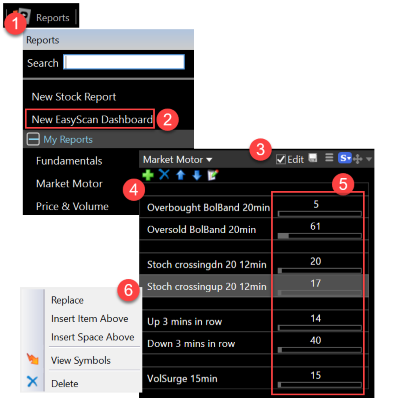
TC2000’s EasyScan system has long been one of its defining features. Traders can create custom scans using price, volume, indicators, fundamentals, and proprietary Personal Criteria Formulas.
TC2000 Screener Test Results
| Score | Rating | Weight | Weighted Score |
|---|---|---|---|
| Scanning Performance | 4.32 | 50% | 2.16 |
| Speed & Ease of Use | 4.83 | 15% | 0.72 |
| Value | 3.41 | 15% | 0.51 |
| Backtesting | 0.00 | 10% | 0.00 |
| Alert Speed | 4.00 | 5% | 0.20 |
| AI & Algo | 1.50 | 5% | 0.08 |
| LST Screener Score | 100% | 3.67 |
What I Like About TC2000
4.32 Strong scanning: TC2000 performed well in my scanning test and supports flexible criteria for technical traders.
4.83 Very fast workflow: Screening, watchlists, and chart analysis work closely together, allowing traders to inspect results quickly.
Strong options integration: TC2000 is particularly attractive to traders who combine stock screening with options analysis.
4.00 Useful alerts: Traders can monitor conditions rather than manually checking the same lists throughout the day.
| ⚡ TC2000 Features | Charts, Custom Indicators, EasyScan |
| 🏆 Unique Features | TC2000 Brokerage, Options Strategies |
| 🎯 Best for | Stock & Options Traders |
| ♲ Subscription | Monthly, Yearly, Bi-Annually |
| 💰 Price | $0 |$25 | $50| $99 |
| 🆓 Free | Try TC2000 Free |
| 💻 OS | PC, Mac, Web |
| 🎮 Trial | Yes, 30-Day |
| ✂ Discount | -25% for 2-Year Subscription |
| 🌎 Region | USA |
The Major Weakness: Backtesting
TC2000 receives 0.00 for backtesting in my methodology because it lacks the conventional historical strategy-testing capability I expect from platforms such as TrendSpider, Optuma, or Portfolio123.
That has a major impact because backtesting carries 10% of my Screener Score.
TC2000 also scores only 1.50 for AI & Algo functionality. Traders looking for AI-assisted screening should consider TrendSpider, Trade Ideas, TradingView, or Tickeron instead.
Who Should Use TC2000?
TC2000 is best suited to active US stock and options traders who value fast technical scanning more than automated strategy testing or AI.
Best for: US equities, options scanning, technical screens, custom formulas, watchlists, and fast chart-based workflows.
Not best for: Historical strategy testing, AI-driven screening, global markets, or deep fundamental investment research.
Read my full TC2000 review for the complete platform test.
8. MetaStock: Best Global Technical Scanner
MetaStock gets a Screener Score of 3.64. Its strongest use case remains experienced technical analysts who want global market data, advanced technical screening, and sophisticated historical testing.
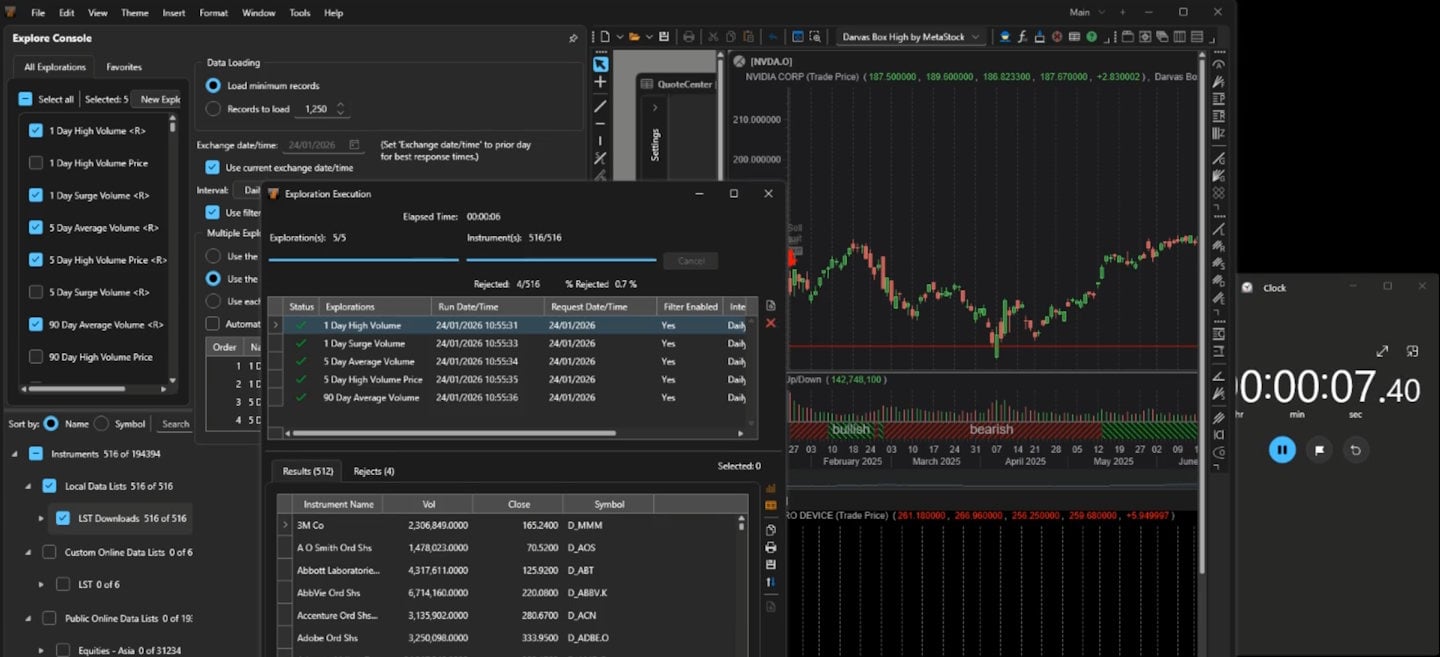
MetaStock has been used by technical analysts for decades, and its Explorer functionality allows traders to search large groups of securities for specified technical conditions.
MetaStock Screener Test Results
| Score | Rating | Weight | Weighted Score |
|---|---|---|---|
| Scanning Performance | 3.71 | 50% | 1.86 |
| Speed & Ease of Use | 3.33 | 15% | 0.50 |
| Value | 3.30 | 15% | 0.49 |
| Backtesting | 4.81 | 10% | 0.48 |
| Alert Speed | 3.67 | 5% | 0.18 |
| AI & Algo | 2.50 | 5% | 0.13 |
| MetaStock Screener Score | 100% | 3.64 |
What MetaStock Does Well
4.81 Excellent backtesting: Historical strategy testing remains one of MetaStock’s strongest capabilities.
Technical-analysis depth: MetaStock supports extensive technical indicators, formulas, exploration, and systematic analysis.
International-market orientation: MetaStock is more appropriate than US-only products when international and multi-market analysis is important.
3.71 Capable scanning: The Explorer can identify securities meeting technical or formula-based conditions across large lists of instruments.
MetaStock’s Refinitiv integration means you get institutional-quality real-time news, analysis, research, and economic outlooks, plus the fastest global news service available in the industry. For international investors, MetaStock is unique because the news is also translated into all major languages.
MetaStock has an incredible database of fundamental global data for screening, not just on companies but on economies and industries; the wealth of data is first-class. Using Refinitiv, you can see an in-depth analysis of company fundamentals, from debt structure to the top 10 investors, including level II; combine that with excellent watch lists featuring fundamentals and powerful scanning of the markets.
MetaStock provides scanning on any stock exchange globally, provided you have the market data package for the region. Screening all trading instruments, including ETFs, Funds, Options, and Forex, is possible. Powered by Refinitiv, extensive analyst ratings and 79 core fundamental financial criteria are available for selection. In total, 269 technical criteria are available for scanning.
| ⚡ Features | Charts, Watchlists, Scanning, Backtesting |
| 🏆 Unique Features | Algorithmic AI Forecasting, Real-time Global Trading News (Multi-language), Candle Pattern Recognition. |
| 🎯 Best for | Stock, FX & Commodity Traders |
| ♲ Subscription | Monthly, Yearly |
| 💰 Price | $75|$100|$265 |
| 💻 OS | PC |
| 🎮 Trial | 30-Day Free Trial |
| ✂ Discount | 3 Months for the Price of 1 (worth $530) |
| 🌎 Region | Global |
Where MetaStock Falls Short
MetaStock’s 3.33 Speed & Ease score is its biggest practical weakness in this comparison.
The platform offers extensive analytical depth, but its workflow is less approachable than modern browser-first products such as TradingView.
Its AI capabilities are lacking compared with TrendSpider, TradingView, and Trade Ideas.
For traders who primarily want a simple screener rather than a complete technical-analysis workstation, MetaStock can therefore be more software than they need.
Who Should Use MetaStock?
I recommend MetaStock to experienced technical analysts who value international market coverage, formula-based research, and historical testing.
Best for: Global markets, real-time news, advanced technical analysis, systematic research, and backtesting.
Not best for: Beginners, simple free screening, or traders primarily looking for AI-assisted workflows.
Read my full MetaStock review for the complete lab assessment.
9. Tickeron: AI Pattern Screener
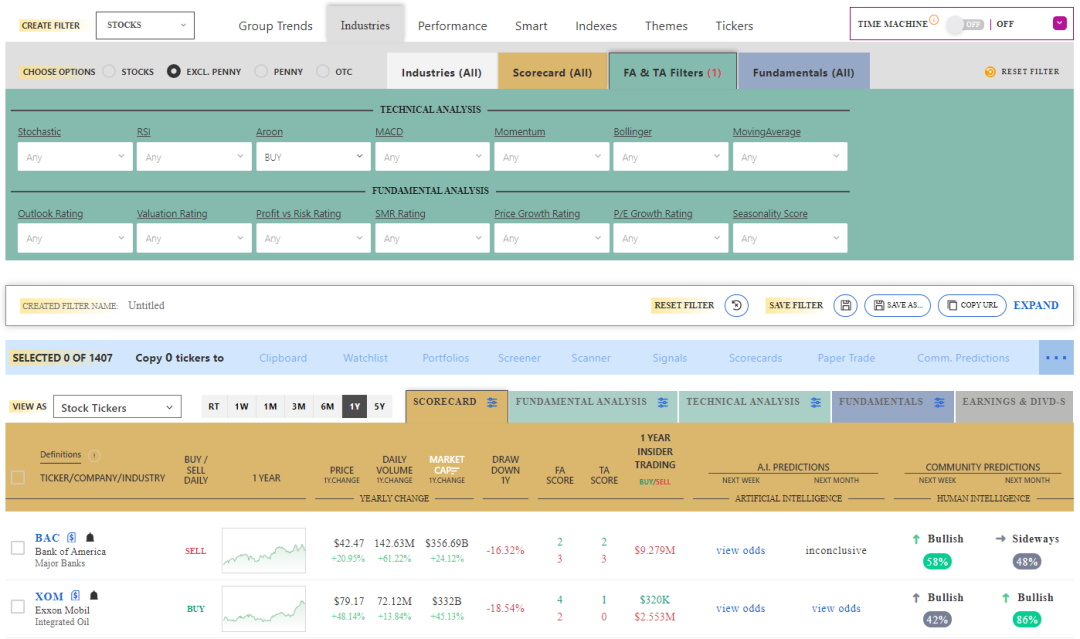
Tickeron ranks ninth with a Screener Score of 2.85. Its conventional scanning performance trails the leading products in my test, but it remains interesting for traders specifically seeking AI-assisted pattern recognition and automated trade ideas.
Tickeron’s approach differs substantially from Stock Rover, Finviz, or TC2000. Much of its value proposition centers on AI-powered pattern recognition, trading signals, forecasting tools, and automated strategy products.
Tickeron Screener Test Results
| Score | Rating | Weight | Weighted Score |
|---|---|---|---|
| Scanning Performance | 2.05 | 50% | 1.03 |
| Speed & Ease of Use | 4.83 | 15% | 0.72 |
| Value | 3.26 | 15% | 0.49 |
| Backtesting | 1.88 | 10% | 0.19 |
| Alert Speed | 4.00 | 5% | 0.20 |
| AI & Algo | 4.50 | 5% | 0.23 |
| LST Screener Score | 100% | 2.85 |
Where Tickeron Stands Out
4.50 AI is the main attraction: Tickeron uses AI across pattern recognition, signals, and automated analytical tools.
4.83 Fast and accessible: It performed extremely well for Speed & Ease of Use in my testing.
Automated pattern identification: Traders who do not want to manually inspect hundreds of charts can use Tickeron’s pattern-recognition systems to narrow their market focus.
4.00 Good alert capability: Signals and identified conditions can be surfaced quickly.
Why Tickeron Ranks Ninth
The issue is the underlying screening score.
2.05 Tickeron’s Scanning Performance result is significantly below TradingView, TrendSpider, Stock Rover, Trade Ideas, and the other traditional screeners above it.
Because scanning itself accounts for 50% of my methodology, strong AI features cannot compensate for weaker conventional screening performance.
Backtesting also scored only 1.88, further reducing its overall result.
Who Should Use Tickeron?
Tickeron makes the most sense for traders specifically interested in AI-generated patterns, signals, and automated idea generation.
Best for: AI pattern recognition, automated signals, and traders wanting algorithmic assistance.
Not best for: Deep custom screening, fundamental research, or users wanting the strongest overall stock screener.
Read my complete Tickeron review for my full assessment of its AI and trading tools.
10. Finviz: Best Simple Free Stock Screener
Finviz earned a Screener Score of 2.67, but this result needs context. Despite its low laboratory score, Finviz remains one of the easiest and most useful free stock screeners for quickly filtering US stocks.
This is a good example of why I publish both a numerical score and a Best For recommendation.
Finviz does not compete with TrendSpider or Portfolio123 for sophisticated strategy testing, automation, or quantitative analysis. But if I simply want to filter US stocks quickly using familiar fundamental and technical criteria, Finviz is remarkably efficient.
Finviz Screener Test Results
| Score | Rating | Weight | Weighted Score |
|---|---|---|---|
| Scanning Performance | 2.26 | 50% | 1.13 |
| Speed & Ease of Use | 4.83 | 15% | 0.72 |
| Value | 1.74 | 15% | 0.26 |
| Backtesting | 2.75 | 10% | 0.28 |
| Alert Speed | 3.67 | 5% | 0.18 |
| AI & Algo | 2.00 | 5% | 0.10 |
| LST Screener Score | 100% | 2.67 |
Why I Still Recommend Finviz
4.83 Extremely easy to use: Finviz is one of the fastest ways to move from a broad US stock universe to a manageable shortlist.
A genuinely useful free screener: Unlike products that provide only a trial, Finviz has a permanent free screening tool.
Fundamental and technical filters: Investors and traders can filter companies using valuation, financial, ownership, performance, price, volume, and technical criteria.
Excellent visualization: The combination of screening, tables, charts, groups, and heatmaps makes it easy to investigate results.
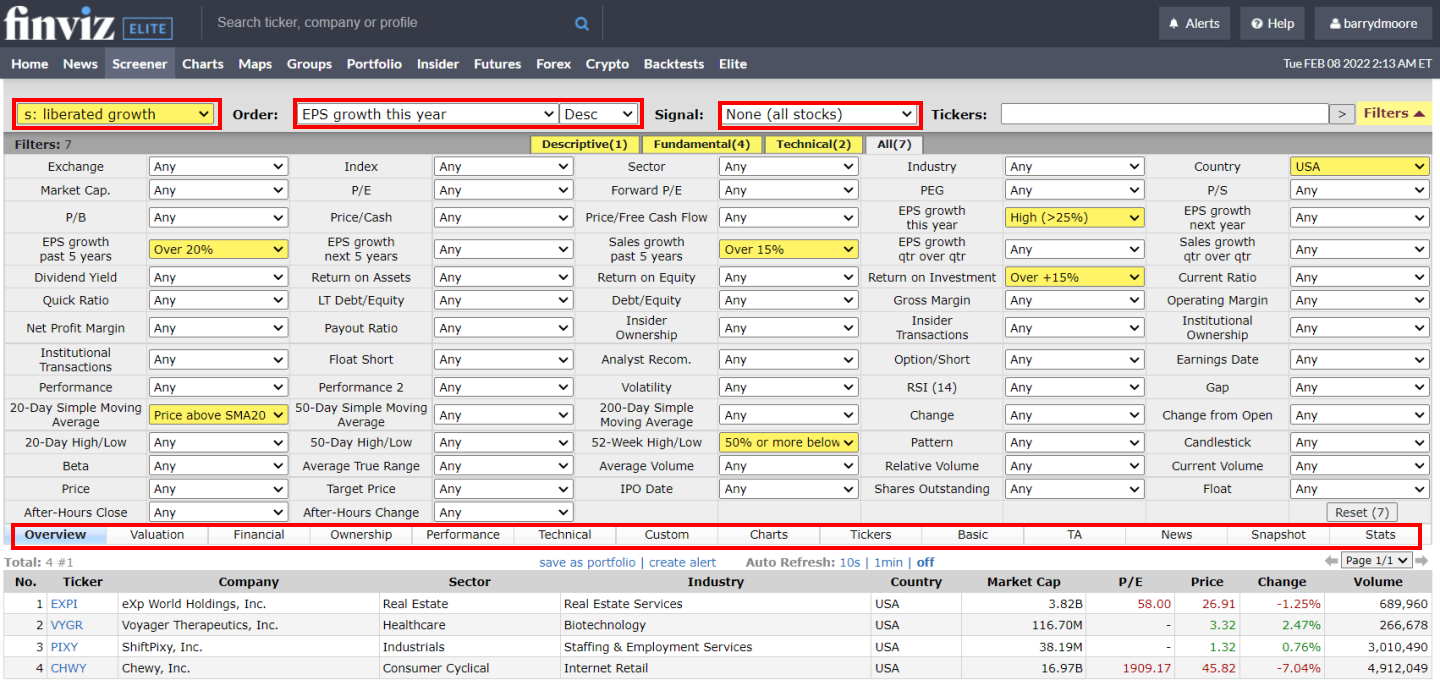
In the screenshot above, I have highlighted the key fields in the Finviz stock screener in red. To test the Finviz screener, I built a growth-stock screening strategy to identify stocks with high EPS growth, sales growth, ROI, and a price above the 20-day moving average.
| ⚡ Finviz Features ? | Screening, Heatmaps, Charts |
| 🏆 Exceptional Features ? | Patterns, Signals, Auto-Trendlines |
| 🎯 Best for | Beginner Investors/Traders |
| ♲ Subscription | Monthly, Yearly |
| 💰 Price | $0 | $25 |
| 🆓 Free Plan | ✔★ |
| 💻 OS | Web Browser |
| 🎮 Trial | 30-Day Money-Back |
| ✂ Discount | 37% Discount on Yearly Plan |
| 🌎 Region | US |
Where Finviz Falls Behind
2.26 Scanning depth is limited compared with specialist platforms. Finviz is excellent for conventional filtering, but it does not offer the same level of custom scanning and automation as TrendSpider or Trade Ideas.
Its real-time data and more advanced functions require Finviz Elite.
Most importantly, Finviz does not provide conventional historical screener backtesting. Traders wanting to determine whether screening rules generated superior historical results should use TrendSpider, Portfolio123, Optuma, or another dedicated testing platform.
Its AI capabilities are also limited compared with the leading AI-enabled products.
Who Should Use Finviz?
I recommend Finviz for investors and traders who want a fast, straightforward US stock screener without having to pay for software immediately.
It is particularly useful for beginners and for experienced investors who simply need a quick first-pass filter.
Best for: Simple free screening, US stocks, fast fundamental filters, technical filters, visualization, and beginners.
Not best for: Historical strategy validation, international equities, advanced real-time scanning, or AI-based research.
Read my complete Finviz review for the full 58-point test.
FAQ
What is the best stock screener?
TradingView is the highest-rated stock screener in my test, with a score of 4.67/5. It provides the strongest overall balance of scanning performance, ease of use, value, backtesting, alerts, AI capability, and global market coverage. However, the best product depends on what you screen for. TrendSpider is stronger for advanced technical scanning, Stock Rover for fundamental investing, and Trade Ideas for real-time day trading.
What is the best free stock screener?
TradingView is my top free stock screener overall, particularly for traders who want technical and fundamental filters combined with global market coverage. For long-term fundamental investors, I prefer Stock Rover, while Finviz remains one of the fastest and simplest free screeners for US stocks.
What is the best stock screener for day trading?
Trade Ideas is my top stock scanner for day trading because it is designed around continuously monitoring real-time US market conditions. TrendSpider is my preferred alternative for swing and technical traders who place greater emphasis on multi-condition scans, backtesting, alerts, and systematic strategies.
What is the best stock screener for long-term investors?
Stock Rover is my top stock screener for long-term fundamental investors. Its strength is the depth of financial data available for screening companies by valuation, growth, profitability, dividends, financial strength, analyst estimates, and other investment factors.
Which stock screener has the best backtesting?
My testing shows Optuma, TrendSpider, MetaStock, and Portfolio123 have particularly strong historical testing capabilities. The appropriate choice depends on the strategy. TrendSpider is particularly strong for technical traders, while Portfolio123 specializes in fundamental and factor-based investing.
What is the difference between a stock screener and a stock scanner?
A stock screener generally filters securities according to selected criteria, such as valuation, earnings growth, price, volume, or technical indicators.
A stock scanner typically monitors the market more continuously for changing conditions, such as breakouts, volume spikes, gaps, or intraday momentum.
The distinction is increasingly blurred because modern platforms such as TradingView, TrendSpider, and Trade Ideas incorporate elements of both.
Can a stock screener tell me which stock will go up?
No. A stock screener can identify stocks meeting specified criteria, but it cannot reliably predict which stocks will rise. Screening is best used as a research filter. It reduces thousands of securities to a manageable shortlist for deeper analysis. This is also why I place significant value on backtesting. A screening rule that sounds logical should still be tested rather than assumed to produce superior returns.
Are paid stock screeners better than free ones?
Not necessarily.
TradingView, Stock Rover, and Finviz all provide useful free screening capabilities. For many investors, these are sufficient.
Paid products become more valuable when you need capabilities such as:
Real-time streaming scans
Complex technical conditions
Extensive fundamental datasets
Historical backtesting
Automated alerts
AI-assisted analysis
Strategy automation
Professional market data
I would only pay for these capabilities if they solve a genuine problem in your trading or investing process.
My Final Verdict
After testing the leading stock screeners, TradingView ranks first overall with an LST Screener Score of 4.67, narrowly ahead of TrendSpider at 4.62 and Stock Rover at 4.47.
But the ranking alone should not determine your choice.
Choose TradingView if you want the best overall combination of free screening, technical analysis, global markets, and ease of use.
Choose TrendSpider if advanced technical scanning, alerts, pattern recognition, and backtesting are central to your trading.
Choose Stock Rover if your decisions are driven primarily by company fundamentals.
Choose Trade Ideas if you are an active US day trader who needs continuously updated real-time scans.
For professional technical analysis, Optuma and MetaStock offer substantially deeper capabilities, while Portfolio123 stands out for quantitative fundamental investing. TC2000 remains strong for US stock and options traders; Tickeron emphasizes AI-assisted pattern recognition; and Finviz remains an excellent, simple, free screener despite its lower overall lab score.
The most important question is therefore not simply “Which stock screener scores highest?”
It is:
“Which screener gives me the data, market coverage, speed, and testing capability required by my actual trading or investing process?”
That is the basis on which I would choose between them.

Hi Michael, your review of ChartMill is available here. I quite liked it, a powerful screener and the trading ideas concept was very good. https://www.liberatedstocktrader.com/chartmill-review/
Hi Michael, thanks for your input here. I have covered Vectorvest, Finviz, and TC2000 from your list. I will add Chart Mill to my list for testing. Wealth365 looks like a seminar plaform, and Chaikin Analytics seems to cost $5,000 per year for specific stock tips, but will take a look.
When you say Gurus, do you mean GuruFocus? If so I have looked at it. It seems similar to Stock Rover but a lot more expensive and with fewer screening criteria and more restrictions on downloadable data.
I really appreciate your input, and will perform more testing.
Any further input is welcome.
Thanks
Barry
Hmmmm, either you’re not getting around much or you might be playing favourites for fees!?! I can list several other platforms winning awards and/or with sophisticated screening abilities, like Wealth365, IBD, VecorVest, Chaikin Analytics, ChartMill, Gurus, etc. For full disclosure, I do use TC2000, VectorVest, Finviz, and Chartmill for both US and CA stocks. I have commented previously but seems you might be too busy to respond.
Stock Rover is the best for sector rotation
Appreciate very much your research in evaluating the different services. Great reviews; very informative and useful.
Which services are best for identifying sector rotation? Your service covering the major indices seems very useful but you don’t apply it to sectors. Why not?