
Compared to competitors, MetaStock, Bloomberg, and Refinitiv, Benzinga Pro offers a compelling service at a significant price discount. I have been using Benzinga Pro and many of its competitors’ tools for over six years, so here’s the lowdown.
Test Results & Ratings
After thorough testing, I’ve found that Benzinga Pro is an excellent choice for U.S. traders seeking a fast, actionable, real-time news feed at a fraction of the cost of a Bloomberg terminal. Priced at just 1/10th of its competitor, Benzinga Pro is particularly well-suited for active day traders and investors who rely on breaking news to inform their trades. I highly recommend it for those looking to capitalize on market-moving events efficiently.
| Test | Tier | Score | Average |
|---|---|---|---|
| Lab Test Composite Score | A | 4.07 | 4.21 |
| Pricing Index | — | $6.48 | $2.74 |
| Value Score (VP) | C | 2.11 | 2.82 |
| Speed & Ease of Use | AA | 4.33 | 4.50 |
| Chart Analysis Depth Index | C | 2.67 | 3.17 |
| Chart Pattern Depth & Accuracy | N/A | N/A | 2.73 |
| Scanning Performance | C | 2.60 | 3.38 |
| Backtesting Performance | N/A | N/A | 3.38 |
| Trading Bot & Auto-Trading Reliability | C | 2.50 | 2.50 |
| AI & Algo Index | C | 2.00 | 2.00 |
| Alert Speed | AA | 4.33 | 3.67 |
| Trade Signal Quality | C | 2.50 | 0.00 |
| Broker Connectivity & Ecosystem Depth | C | 1.50 | 2.00 |
| Portfolio Tool Performance | C | 2.00 | 2.80 |
| Financial News Speed & Depth | AAA | 5.00 | 2.30 |
| Community Utility Index (CUI) | B | 3.25 | 3.25 |
| Support Infrastructure & SLA Audit | A | 4.25 | 3.75 |
Tested using rating system v3.
See the 2026 v3 58-point Benzinga Pro test and benchmarks.
Pros
✔ AAA Fastest Real-time News Feed
✔ Live Audio News Squawk Box
✔ Options Alerts
✔ Analyst Rating Calendar
✔ Price Change Since News
✔ Sentiment Indicators
✔ News Rated for Impact
✔ 1/10th the Price of Bloomberg
Cons
✘ No Broker Integration
✘ No Backtesting

Benzinga Pro offers a comprehensive suite of tools, including detailed charts, financial data, screeners, options mentoring, and an advanced calendar system. Standout features include news sentiment analysis, direct access to a professional newsdesk, a real-time squawk box, and instant alerts for market-moving news.
Benzinga Pro offers a top-tier platform for traders, complete with integrated chat streams and expert options mentoring to help you maximize your gains. I highly recommend it.
Key Features
| ⚡ Features | Real-time News, Calendar, Charts |
| 🏆 Unique Features | Audio Squawk Box, News Sentiment, News Rating & Alerts |
| 🎯 Best for | Stock, FX & Crypto Traders |
| ♲ Subscription | Monthly, Yearly |
| 💰 Price | $37 | $197 |
| 💻 OS | Web |
| 🎮 Trial | Yes 14-Day |
| 🌎 Region | North America |
| ✂ Discount | 16% Annual Discount |
Verdict
Benzinga Pro is built for traders who treat news as the first mover. Here, the edge isn’t backtesting, trade Automation, AI power, or portfolio analytics—it’s speed to awareness: headline flow, squawk, and alerting that let you react before the move is fully priced in. If your workflow starts with “what just happened and why?”, this tool is meaningful.

Pricing Index
Benzinga Pro’s cost-per-day is $6.48 on an annual plan, compared with the median of $2.74. Pricing Index is measured in dollars (not a 0–5 rating), so the question is simple: do you use the service often enough to justify the daily cost?
At this price level, you’re paying for speed-to-awareness, a news feed that changes decisions intra-day, not for broad feature coverage. If the squawk, filters, and alerts are part of your daily routine, the cost-per-day can be rational. If it’s an occasional check-in, the pricing becomes pure drag.
| Metric | Calculation | Benzinga Pro | High | Median | Low |
|---|---|---|---|---|---|
| Cost-per-day | $/day on an annual plan. Minimum viable plan with real-time exchange data | $6.48 | $9.99 | $2.74 | $0.74 |
| $ per feature | Effective Monthly Cost /Total Features | $19.70 | $23.37 | $5.95 | $1.94 |
| Effective Monthly Cost (EMC) | EMC = (Plan price + required real-time data fees + key premium add-ons) / month | $197.00 | $303.87 | $83.32 | $22.50 |
Key takeaway: the economics only work if you actively trade catalysts and keep the feed/alerts running most market days.
The Benzinga PRO basic plan costs $37 per month for real-time news feeds and watchlist alerts. I do not recommend the basic plan because it lacks advanced filtering, which means you will be overwhelmed with news you cannot take action on.
I recommend the Benzinga Pro Essential plan, which costs $166 per month and includes advanced filtering, a squawk box, calendars, sentiment indicators, and chat with the news desk functionality.
| Basic | Essential | Options Mentor |
| $37* | $197* | $381* |
| Real-time Newsfeed | Real-time Quotes | Trading Mentorship |
| SEC Filings | Audio Squawk | Options Inner Circles Chat |
| Watchlist & News Alerts | Newsdesk Chat | Nic Chahine’s Reports |
| Sentiment Indicators | ||
| Advanced Filtering | ||
| Benzinga Signals |
Benzinga Pro Costs. *Cost per month on yearly subscription
Benzinga Pro Pricing & Discounts: Which Plan Is Best in 2026
Value Score (VP)
Benzinga Pro’s Value Score is 2.11 versus the median 2.82. That gap is mostly about breadth and depth outside its core mission—this is not a ‘do everything’ platform.
In practice, the value proposition is strongest when the news workflow is your edge: filtered catalysts, rapid interpretation, and configurable alerts. If you also expect rich chart-building, scripting, portfolio health analytics, and backtesting in the same subscription, the value score is a cautionary sign.
| Metric | Calculation | Benzinga Pro | High | Median | Low |
|---|---|---|---|---|---|
| Value Score | Sum of Feature Quality (60% Weight), Feature Depth (30%) & Device Support Depth (10%) | 2.11 | 4.37 | 2.82 | 0.77 |
| Value Rank | Percentile Ranking | 1.00 | 5.00 | 3.00 | 1.00 |
| Feature Quality | Average of All Feature Quality Ratings | 2.69 | 4.50 | 3.00 | 1.60 |
| Feature Breadth | Feature richness (count of meaningful core features) | 10 | 20 | 11 | 7 |
| Feature Depth | Percentile Ranking | 1.00 | 5.00 | 2.00 | 1.00 |
| Device Support Depth | Web 2 points, (PC, Android/iOS/ 1 Point each) | 2.00 | 5.00 | 2.00 | 1.00 |
| Value Score Test Winners | TrendSpider 4.20 | Trade Ideas 4.05 |
Benzinga Real-time News vs. The Competition
Compared with Benzinga Pro’s news service, MetaStock, Bloomberg, TrendSpider, and TradingView, our tests show it wins for real-time news and value for money.
Benzinga Pro’s key competitors are MetaStock, Reuters Eikon, and Bloomberg. Benzinga delivers newsfeeds as fast as its rivals but beats them on price. Benzinga Pro costs $166 monthly, compared to MetaStock Xenith, $265, or Bloomberg, $2,000.
While Benzinga Pro beats the competition on price, it focuses specifically on actionable US news for traders. Meanwhile, Refinitiv, Eikon, and Bloomberg provide global financial newsfeeds. Additionally, Bloomberg requires a dedicated hardware terminal.
| Features? | Benzinga Pro | MetaStock R/T | Bloomberg |
| Rating | 4.04 | 4.42 | 4.3 |
| Pricing | $37 | $197 | $75|$100|$265 | $2,000/m |
| Global Market Data | USA | ✔ | ✔ |
| Powerful Charts | ✔ | ✔ | ✔ |
| Stocks | ✔ | ✔ | ✔ |
| Futures | ✔ | ✔ | ✔ |
| Forex | ✔ | ✔ | ✔ |
| Cryptocurrency | ✔ | ✘ | ✔ |
| Social Community | ✔ | ✘ | ✘ |
| Real-time News | ✔ | ✔ | ✔ |
| Screeners | ✔ | ✔ | ✔ |
| News Backtesting | ✘ | ✘ | ✘ |
| Backtesting | ✘ | ✔ | ✔ |
| Code-Free Backtesting | ✘ | ✘ | ✘ |
| Automated Chart Analysis | ✘ | ✔ | ✘ |
Table: Benzinga vs. Bloomberg, MetaStock, and TrendSpider – Price Comparison North America Data
As you can see, Benzinga Pro is half the price of its nearest competitor, MetaStock R/T. However, MetaStock does come with compelling stock chart analysis, backtesting, and forecasting. Bloomberg is rated lower due to its high cost and limited availability for retail investors.
Financial News Speed & Depth
Benzinga Pro’s superpower scoring AAA 5.00 for Financial News Speed & Depth, hitting the high and setting the standard benchmark 5.00. This is the category it’s built to win.
If you trade around earnings, guidance, macro headlines, and unusual events, faster and filterable news can be a real edge. For slower timeframes, you’ll value organization and relevance more than raw seconds—Benzinga still performs well, but the payoff is different.
| Metric | Calculation | Benzinga Pro | High | Median | Low |
|---|---|---|---|---|---|
| Financial News Speed & Quality Rating | Weighted rubric (news scanning, plots, watchlist, filtering, providers, alerts, real-time) | 5.00 | 5.00 | 2.30 | 0.00 |
| News Delay vs Primary Wires | Seconds of delay vs Bloomberg/Reuters (range) | 1s – 3s | < 1 s | 60–300 s | Hours/Days |
| Financial News Speed & Depth Test Winners | MetaStock 5.00 | Benzinga Pro 5.00 | Scanz 5.00 |
My audit notes: The industry standard for retail news speed. Their “Squawk” often beats the text headlines.
In Context: Financial News Speed & Depth is Benzinga Pro’s signature category. The scoring rewards not just “has news,” but news that is filterable, alertable, multi-sourced, and truly real-time. In my audit notes, the squawk and feed speed are the differentiators: it’s built to surface what matters fast, not to produce long research essays.
BZWire Real-Time Newsfeed
Core to the Benzinga Pro service is access to the real-time newsfeed, which updates quickly and effectively. BZWire includes all Securities & Exchange Commission (SEC) news and real-time PR newsfeeds. These can be incredibly important because SEC/FDA announcements can seriously move stocks.
Also, important company PR announcements are timed to coincide with or counteract the news, so receiving these as quickly as possible is a serious bonus.
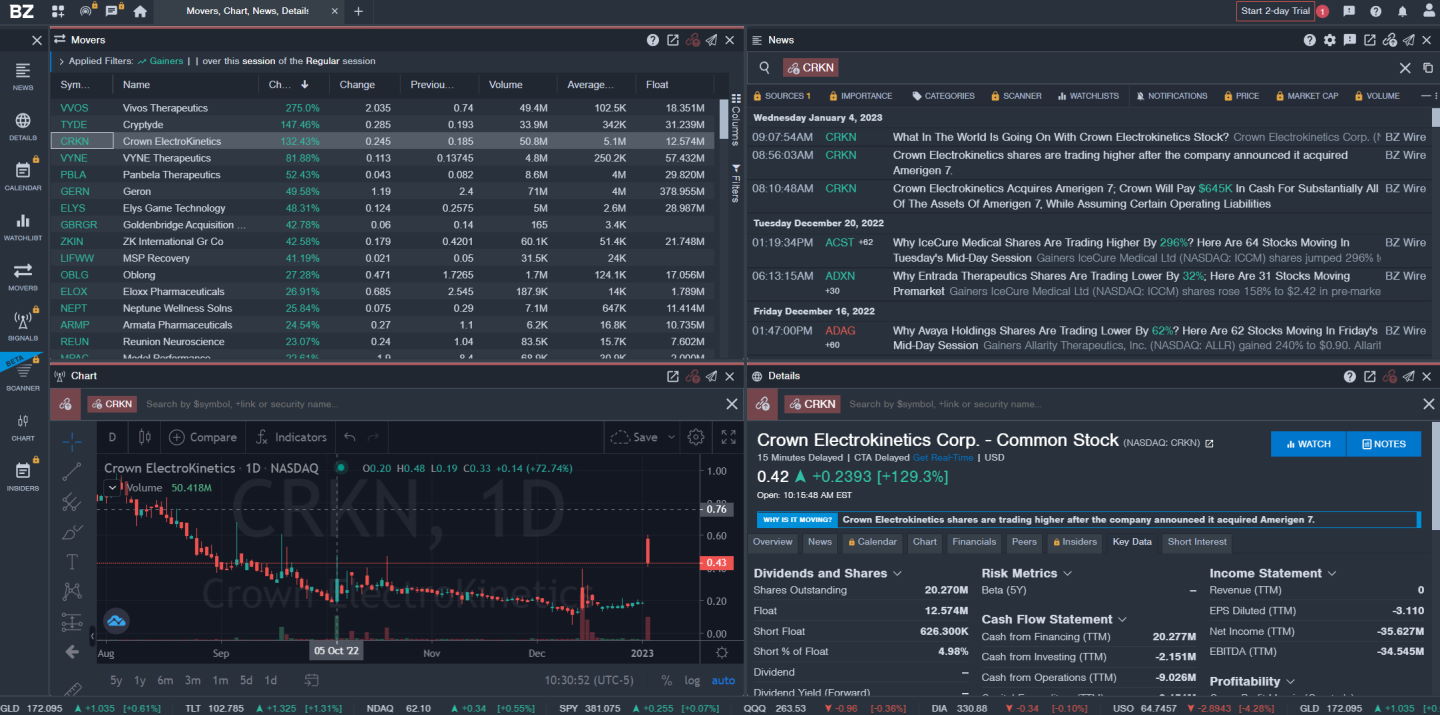
Please do not underestimate the newsfeed; it is truly enormous. Despite the depth of financial content being released every minute, the Benzinga PRO web-based application is high-speed, responsive, and configurable. The configurable nature of the newsfeed is what makes the service so good.
I personally only want to see market-moving exclusives, hot news, market updates, and technology news, which are readily selectable. There are 20 categories to choose from, and each type of news can be color-coded to match your requirements.
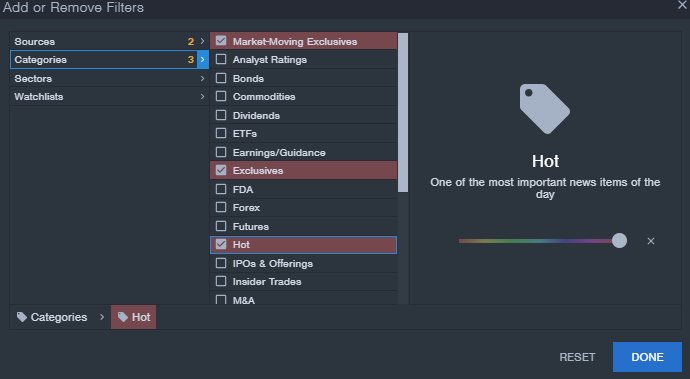
Newswire Categories
| Analyst Ratings | IPO’s |
| Bonds | Insider Trades |
| Commodities | M&A – Mergers & Acquisitions |
| Dividends | Market Moving Exclusives |
| ETFs | Market Updates |
| Earnings & Guidance | Options |
| Exclusives | Rumors |
| Forex | Short Sellers |
| Futures | Trade-Ideas |
| Hot | SEC |
| Stock Splits | Tech |
Table: Benzinga Newswire Categories – My Favorites in Green.
You can also receive news from Benzinga partners, including many news corporations and online outlets such as the New York Times and Seeking Alpha.
Sentiment Indicators
News sentiment indicators are an innovative feature that allows you to see the sentiment of the analyst who submits the news item. You see this in the color of the ticker symbol: red is bearish, green is bullish. This is unique and a great asset.
Alert Speed
Benzinga Pro scores AA 4.33 on Alert Speed, above the median 3.67. For many traders, this is the single most purchase-justifying category.
Alerting reduces screen time and prevents missed catalysts—especially when you cover many tickers. The practical test is whether alerts arrive fast and in the channels you actually use (desktop, email, SMS, etc.), without artificial caps.
| Metric | Calculation | Benzinga Pro | High | Median | Low |
|---|---|---|---|---|---|
| Alert Trigger Latency & Delivery Speed | Avg of Concurrent Alerts, Alert Streams & Alert Speed Rating scores | 4.33 | 4.67 | 3.67 | 2.30 |
| Concurrent Alerts | 1 point per 50 (max 5 points) | 5.00 | 5.00 | 5.00 | 5.00 |
| Concurrent Alert Count | Raw capacity | Unlimited | 2000 | 875 | 400 |
| Alert Streams Richness | 1 point per stream (email/webhook/SMS/app; max 5) | 5.00 | 5.00 | 2.00 | 1.00 |
| Alert Speed Rating | Speed rating points | 5.00 | 5.00 | 3.00 | 1.00 |
| Alert Speed Test Winners | TrendSpider 4.33 | Benzinga Pro 4.33 |
My audit notes: Primarily real-time news/market alerts; supports desktop/browser-style notifications, voice alerts, and email; no alert-cap. Benzinga Pro markets customizable real-time alerts.
Key takeaway: alerting is a core strength—its capacity and delivery options are strong, directly supporting catalyst-based trading workflows.
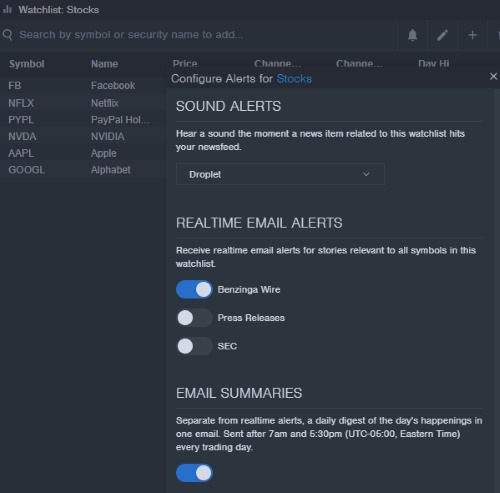
Newsfeed Alerts
Benzinga Pro newsfeed alerts allow you to set specific alarms for stock market sectors or categories. If any hot news or market-moving news is announced, you can be alerted via email, desktop pop-up, or sound.
Alerts hugely benefit the trader, so you do not need to watch the newsfeed continually; you can be trading and hear the alarm as a call to action. Benzinga Pro lets you set up as many watchlists as you wish, and you can receive alerts on specifically those stocks in the watchlist, for example, those that matter to you. You can get real-time alerts and summary emails for your watchlist.
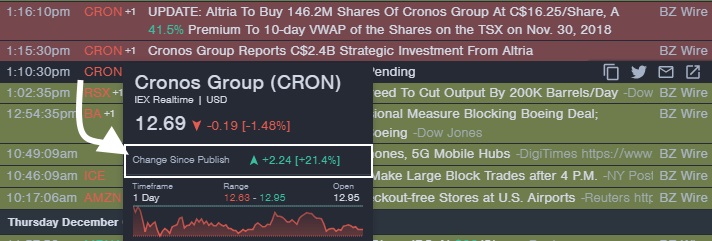
Price Change Since Published
Benzinga is committed to delivering timely news that empowers you to act on market movements and capitalize on opportunities. To reinforce this commitment, they’ve introduced a new feature called Change Since Publish. This simple yet impactful addition to their newsfeed highlights their dedication to continuous innovation, making it easier than ever to stay informed and ahead of the market.
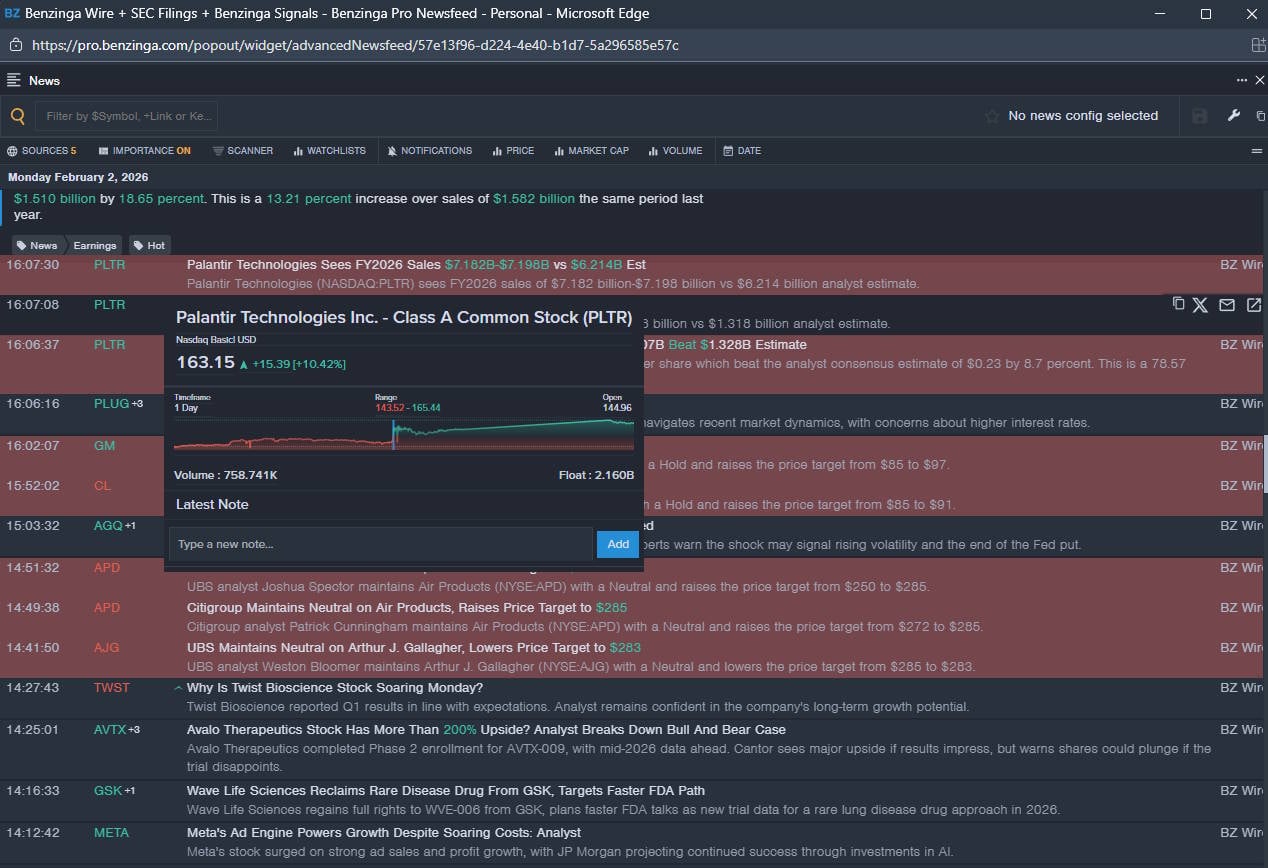
Hover your mouse over any stock ticker in the advanced newsfeed. A mini-chart will appear, indicating if the news positively or negatively impacted the stock price. This is a very nice feature.
In the example above, you can see an announcement that Cronos Group will receive a strategic investment from Altria; the stock moved 21% over the next two trading days.
Here is another example of how real-time news can impact the market. In the example below, President Trump announced that the Farm Bill is in “good shape.” Benzinga has categorized all potential companies that would benefit from a positive farm bill and grouped them into a “Change Since Published” report. Inside the chart, you will see a vertical line or a Change Since Publish label; this vertical line is when the news broke on the Benzinga newswire.
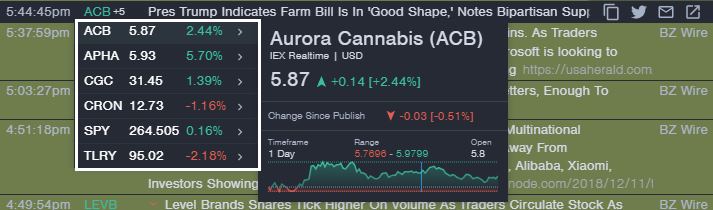
As you can see from the six stocks that Benzinga analysts targeted, four stocks have been gaining since the news was released; that is called an edge in the market.
Options Alerts & Calendar
Benzinga offers Stock Options Alerts that send alarms when anomalies or opportunities arise in options pricing; this is designed to give options traders an edge by highlighting potentially exploitable situations. Options activity is a specific upgrade for all Essential service pricing.
Benzinga’s powerful Unusual Options Activity Signal allows traders to review recent large near-or-in-the-money options trades. This can be incredibly beneficial for traders who want to ride on the coattails of institutional options traders. For $27/mo, this unique and exclusive service, which includes an Options Squawk Box, could make a difference in your options trading success.
Speed & Ease of Use
Benzinga Pro scores AA 4.33 for Speed & Ease of Use, slightly under the median 4.50. That’s still a strong result for a news-first workstation.
The sub-metrics matter because intraday workflows are fragile: every extra click and every lagging pane increases hesitation when a catalyst hits. Benzinga Pro’s design leans minimalist and fast, prioritizing alert-driven navigation over deep chart layout management.
| Metric | Calculation | Benzinga Pro | High | Median | Low |
|---|---|---|---|---|---|
| Speed & Use Index Rating | Average of Time to Chart Performance, Multimonitor Chart Speed & 3 Click Rule: Ease of Use | 4.33 | 5.00 | 4.50 | 3.25 |
| Time to Chart Speed (Seconds) | Seconds from clicking the icon to a fully loaded chart with 200 price bars & 2 indicators. | 7.22 | 17.03 | 4.70 | 1.55 |
| Time to Chart Performance | Points (<5s=5; <10=4.5; <15=4; <20=3) | 4.50 | 5.00 | 4.50 | 3.00 |
| Multi-Chart Latency (ms) | Delay when syncing 4 charts | 250.00 | 667 | 209 | 10 |
| Multimonitor Chart Speed | Multi-chart sync points | 3.50 | 5.00 | 4.00 | 0.00 |
| 3 Click Rule: Ease of Use | 5 Click Points. Each click > 3 = 1 minus point | 5.00 | 5.00 | 5.00 | 1.00 |
| Speed & Ease of Use Test Winners | Stock Rover 5.00 | Seeking Alpha 5.00 | TrendSpider 4.67 |
Squawk Box Audio News
For sheer speed, Benzinga’s Squawk Box is Elite. It frees you from staring at the on-screen newsfeed by having newsroom reporters read the latest high-impact news live as it breaks. Squawk is one of the biggest benefits of the Benzinga Pro Essentials service.
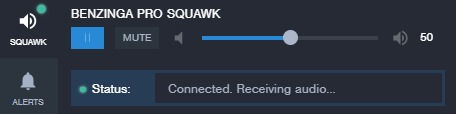
This is impressive; I have it open while watching the markets, so I do not need to constantly watch the screen. Every two minutes, a real-time audio feed announces the latest hot news via my PC speakers; this service alone is worth the upgrade to Benzinga PRO Essential.
As I wrote this, an audio announcement showed that Novartis got FDA approval for a new drug. I just checked online; this is neither on the web nor announced on Bloomberg TV. Now, that is an advantage worth buying.
Chart Analysis Depth Index
Benzinga Pro lands at 2.67 on Chart Analysis Depth, below the median 3.17. The score reflects a clear positioning choice: charts are for confirmation, not for building custom indicators and workflows inside the platform.
Where this matters: if you rely on custom indicator coding, strategy scripting, or extensive indicator libraries, you will quickly hit a ceiling. If your workflow is ‘headline → quick technical check → execute elsewhere,’ the chart depth is usually sufficient.
| Metric | Calculation | Benzinga Pro | High | Median | Low |
|---|---|---|---|---|---|
| Chart Analysis Depth Index | Average of Chart Depth, Indicator Depth & Custom Coding Scores | 2.67 | 5.00 | 3.17 | 0.50 |
| Chart Types | Total Count | 20.00 | 100.00 | 30.00 | 10.00 |
| Chart Depth | Chart Type Score 0.3 points per chart | 5.00 | 5.00 | 3.00 | 0.30 |
| Indicators | Total Count | 120.00 | 1000.00 | 240.00 | 70.00 |
| Indicator Depth | Indicators Scores 0.025 points per indicator | 3.00 | 5.00 | 2.90 | 0.00 |
| Custom Indicator Coding | Available = 5 Points | 0.00 | 5.00 | 2.50 | 0.00 |
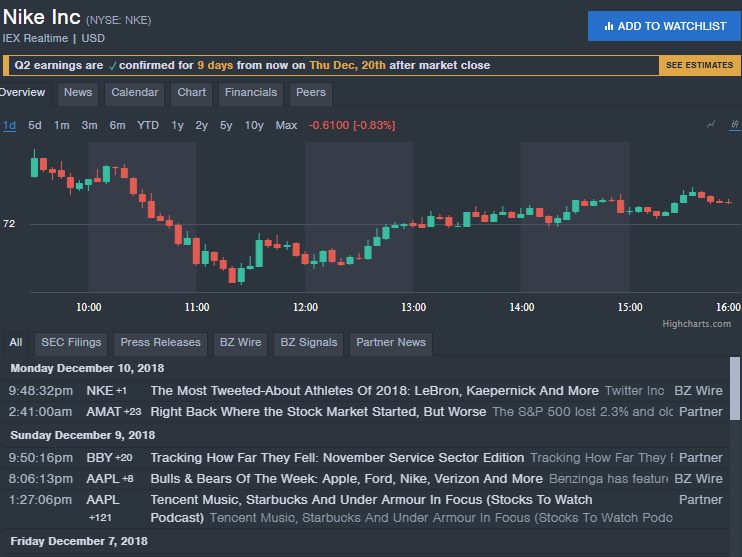
Over the past few years, Benzinga Pro has dramatically improved its technical analysis charting. Benzinga has integrated a cut-down version of TradingView (our trading software review winner). It offers 120 indicators, real-time stock charts, and 20 chart types, including bars, candles, Heiken Ashi, Line, Area, and Baseline charts. You can now draw on charts and perform solid technical analysis.
| Technical Charting? | Rank | Chart Types | Indicators |
| TrendSpider | #1 | 12 | 140 |
| TradingView | #1 | 21 | 400 |
| MetaStock | #2 | 15 | 300 |
| TrendSpider | #3 | 12 | 140 |
| Benzinga Pro | #4 | 20 | 120 |
| Finviz | #5 | 5 | 125 |
| Trade Ideas | #5 | 6 | 80 |
Security SnapShots
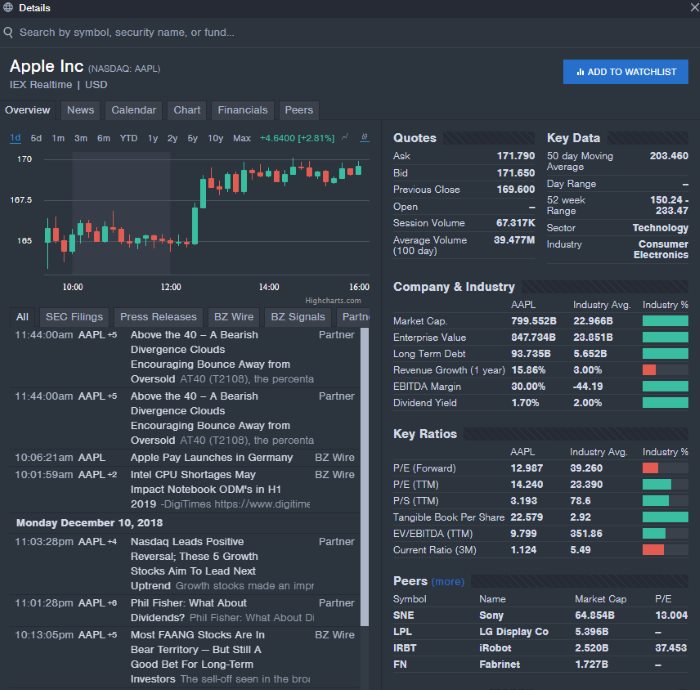
The Security Snapshot View is unique to Benzinga, and it is essentially a summary of all the critical news, fundamentals, and charts. Snapshots are designed to give you a clean, quick view of the whole picture for a given stock, including all the core financial documents like balance sheets and income statement information.
In summary, the Benzinga Basic Package is exceptionally cost-effective. It gives you access to real-time news at a fraction of the cost of other news providers like Bloomberg and Reuters, giving you a professional edge without the expense.
Chart Pattern Depth & Accuracy
Benzinga Pro scores 0.00 on Chart Pattern Depth & Accuracy, versus the median 0.00. In plain terms: it doesn’t try to be a pattern-recognition engine.
If your process depends on automatic discovery of candlestick or trend patterns, this is a hard limitation. If your process requires pattern recognition, you can see the leaders below.
| Metric | Calculation | Benzinga Pro | High | Median | Low |
|---|---|---|---|---|---|
| Pattern Recognition Efficacy & Accuracy | Average of Pattern Recognition Depth & Accuracy Scores | 0.00 | 4.88 | 2.73 | 0.00 |
| Total Patterns | Count of unique patterns recognized | 0 | 226 | 57 | 0 |
| Chart Pattern Recognition & Accuracy Test Winners | TrendSpider 4.88 | Trade Ideas 4.62 |
Scanning Performance
Benzinga Pro scores 2.60 for Scanning Performance, below the median 3.38 despite very fast raw scanning speed. The reason is depth: speed alone doesn’t replace flexible criteria and custom logic.
For traders who want rapid, frequently refreshed filters (especially around news/catalysts), the speed component is meaningful. For systematic screening workflows, missing custom code scanning and limited expressiveness can be the bigger constraint.
My audit notes: Fast, deep scanning with real-time refresh and incredible news scanning. Speed is excellent, but the lack of custom logic limits flexibility.
| Metric | Calculation | Benzinga Pro | High | Median | Low |
|---|---|---|---|---|---|
| Market Scanning Latency & Depth | Average of Scanning Speed, Criteria & Customer Code Scores | 2.60 | 4.25 | 3.38 | 0.80 |
| Scanner Performance (ms) | Milliseconds to search the entire S&P 500 across 5 different criteria. | 84.00 | 2500.00 | 450.00 | 90.00 |
| Scanning Speed Points | Points (<100ms=5; <200=4.5; <500=4; <1000=3; <2000=2) | 5.00 | 5.00 | 4.00 | 1.00 |
| Scanner Auto-Refresh Rate (seconds) | Auto-Refresh Speed | 1.00 | 60.00 | 1.00 | 0.00 |
| Scanning Criteria & Depth | Total Criteria Count | 224.00 | 675.00 | 200.00 | 30.00 |
| Scanning Criteria & Depth | Scanning Criteria 0.0125 points per criteria | 2.80 | 5.00 | 2.50 | 1.00 |
| Custom Code Scanning | Exists 5 Points | 0.00 | 5.00 | 5.00 | 0.00 |
| Scanning Performance Test Winners | Stock Rover 5.00 | TrendSpider 4.67 |
Calendar Suite
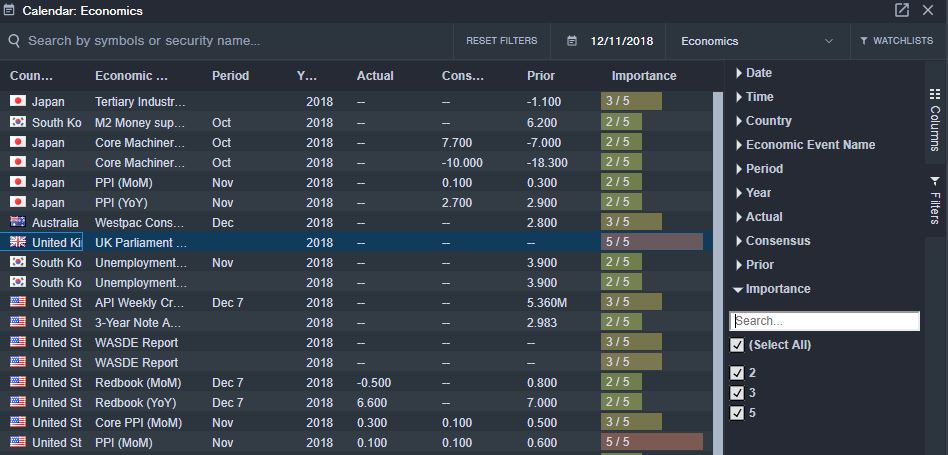
Below, we see the Benzinga Calendar. You can instantly see what macroeconomic news is upcoming, but what you also see in the “importance” column on the right is the potential impact of the news as rated by the Benzinga market analysts.
As you open the filter on the right, you can filter on anything from country, time, and especially the importance of the news. The granular level of filtering enables you to extract all of the value out of the news by only seeing the potential market-moving news.
Backtesting Performance
Benzinga Pro scores 0.00 for Backtesting Performance. This is expected: it’s a real-time information and alerting platform, not a strategy research lab.
If you need to validate rules with historical simulations and reporting, you’ll pair Benzinga Pro with a dedicated backtesting tool. If you trade discretionary catalysts, backtesting may be optional—but the platform will not statistically prove an edge for you.
| Metric | Calculation | Benzinga Pro | High | Median | Low |
|---|---|---|---|---|---|
| Quantitative Backtesting Fidelity | Avg of Speed, No-Code, Flexible Coding, Report Quality, Basket Backtesting | N/A | 4.90 | 3.38 | 0.00 |
| Backtesting Speed (ms) | Time to run 10y daily or ~2 months 5-min simulation | N/A | 6000 | 302 | 7 |
| Backtesting Speed | Points (<200=5; <500=4.5; <10000=4; <20000=3) | N/A | 5.00 | 4.25 | 0.00 |
| No Coding Required | Zero-code backtesting (5 points) | N/A | 5.00 | 5.00 | 0.00 |
| Flexible Coding Backtesting | Exists = 5 points | N/A | 5.00 | 5.00 | 0.00 |
| Backtesting Report Quality | Report quality percent | N/A | 100% | 70% | 0% |
| Backtesting Report Quality | Points (0.05 points per 1%) | N/A | 5.00 | 2.25 | 0.00 |
| Multi-Stock Basket Backtesting | If exists = 5 points | N/A | 5.00 | 5.00 | 0.00 |
| Backtesting Performance Test Winners | Optuma 4.94 | TrendSpider 4.88 | MetaStock 4.81 |
AI & Algo Index
Benzinga Pro sits at 3.50 on the AI & Algo Index, right on the median 2.00. It’s algorithmic in its workflow but not an AI-native strategy-synthesis platform.
That’s fine—as long as you don’t buy it expecting forecasting models, agentic strategy design, or automated decisioning. The real value is rapid headline interpretation and structuring, where transparency about what labels mean is more important than flashy claims.
| Metric | Calculation | Benzinga Pro | High | Median | Low |
|---|---|---|---|---|---|
| Algorithmic Intelligence & AI Tier Index | Sum of Algo Depth, AI Layer & Transparency Points | 3.50 | 5.00 | 2.00 | 1.00 |
| Algo Depth | Points: 0.5 alerts only; 1.0 rules strategies; 1.5 backtesting+factor/portfolio rules; 2.0 advanced quant platform | 1.00 | 2.00 | 1.50 | 1.00 |
| AI Layer | 0.0 none; 1.0 assistive; 1.5 ML signals core; 2.0 AI-native decisioning | 1.50 | 2.00 | 0.00 | 0.00 |
| Transparency | 0.0 black-box; 0.5 some; 1.0 clear methodology + validation artifacts | 1.00 | 1.00 | 1.00 | 0.00 |
| AI Reasoning Tier Level Verified | Sentiment Analysis | — | — | — |
| AI & Algo Index Test Winners | TrendSpider 5.00 | Trade Ideas 4.50 |
My audit notes: Explicitly markets a “market-trained AI” as part of the product positioning, though it is not an auto-executing bot stack. Squawk & News AI: Excellent at “reasoning” through headlines to determine Bullish/Bearish sentiment via NLP.
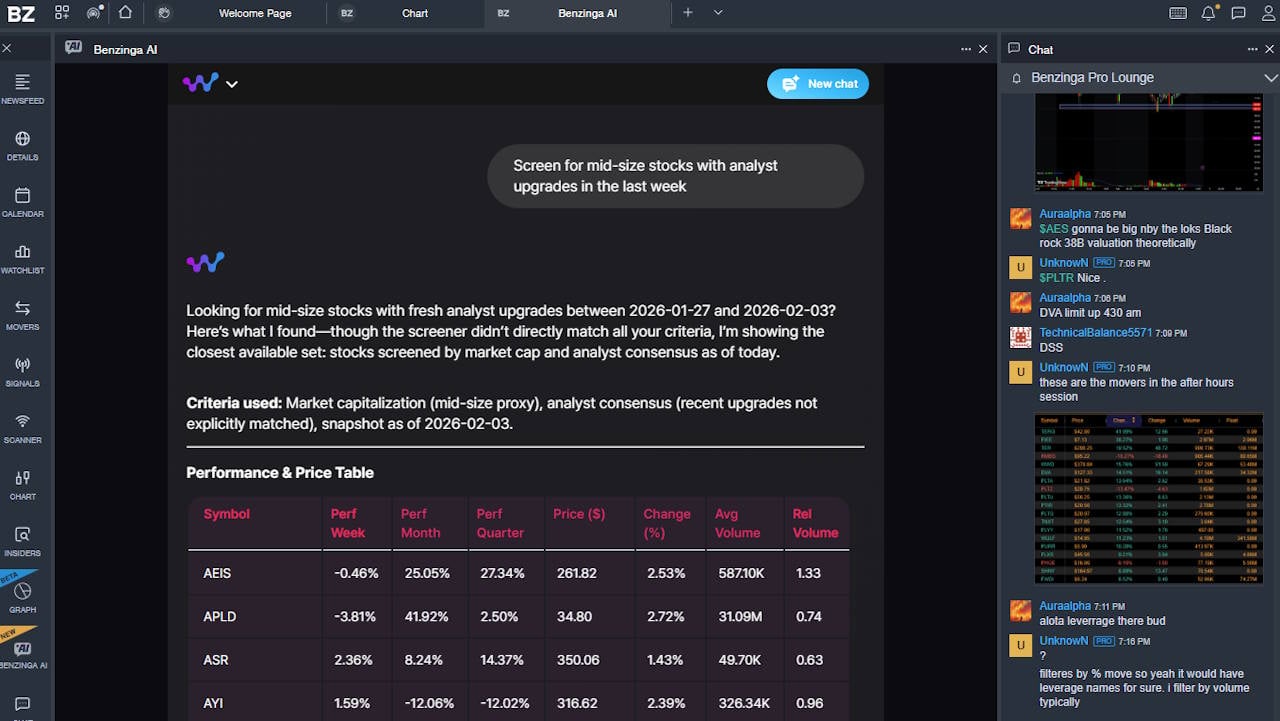
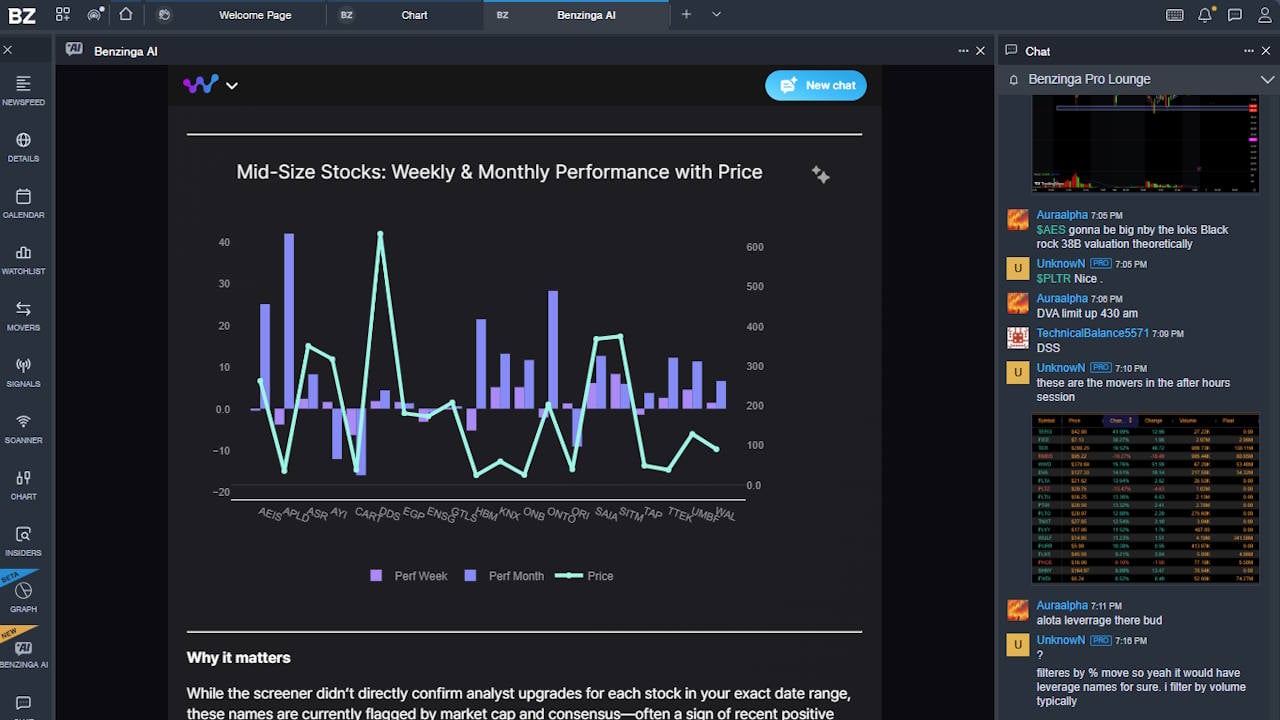
The introduction of the AI chatbot is extremely helpful and provides excellent reports.
Analyst Rating Calendar
The guidance section of the Benzinga Pro calendar suite is designed to provide real-time alerts on analyst upgrades and downgrades. Traders pay serious money for this data because Wall Street analyst guidance changes move stocks and impact markets.
Imagine having these analyst ratings streamed to your desktop in real time. In the image below, I have a column highlighting the company symbol, the analysts covering the stock, the analyst’s name, and the action. In this instance, you see there is a downgrade for VNDA.
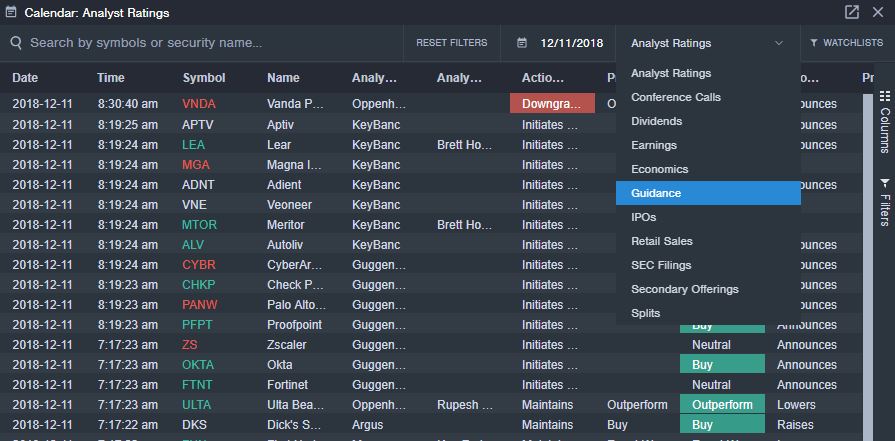
I dropped down the calendar selection box (on the right) to show you the different types you can choose from. The calendars cover upcoming conference calls, dividends, earnings, economics, earnings guidance, IPOs, retail sales, SEC filings, secondary offerings, and split announcements.
Broker Connectivity & Ecosystem Depth
Benzinga Pro scores 1.50 on Broker Connectivity & Ecosystem Depth, below the median 2.00. It can integrate broadly as a read-only access to your brokerage, but it is not a primary order-execution platform with published latency guarantees.
| Metric | Calculation | Benzinga Pro | High | Median | Low |
|---|---|---|---|---|---|
| Asset & Data Coverage Index | Avg of Live Trading, Broker Integration & Asset/Data Coverage | 1.50 | 5.00 | 2.00 | 0.67 |
| Live Trading | 5 points | 0.00 | 5.00 | 5.00 | 0.00 |
| Total number of brokers integrated | Raw broker count | 100 | 1200 | 2 | 0 |
| Broker Integration | 0.1 point per broker (max 5 points) | 2.50 | 5.00 | 0.20 | 0.00 |
| Asset & Data Coverage | Stocks, Options, FX, US Exchanges, International Exchanges (1 point each) | 2 | 5 | 2 | 2 |
| Broker Connectivity & Ecosystem Test Winners | MetaTrader 5.00 | TrendSpider 4.43 |
My audit notes: Benzinga Pro lets you link or select a broker, but only for read-only access to your account; it does not provide direct live trade execution.
Community Utility Index (CUI)
Benzinga Pro scores 3.25 on Community Utility, right around the median 3.25. The community dynamic is more ‘newsroom’ than ‘research lab.’
If you want fast shared attention, what traders are watching now, the community helps. If you want reusable IP like scripts, backtests, and indicator libraries, you’ll typically find that in charting/scripting-centric platforms.
| Metric | Calculation | Benzinga Pro | High | Median | Low |
|---|---|---|---|---|---|
| Community Utility Index | Avg of Active Community Size & Quality of Contribution scores | 3.25 | 5.00 | 3.25 | 1.80 |
| Active Community Size | Active users/community density rating | 3.50 | 5.00 | 3.00 | 2.00 |
| Quality of Community Contribution | Quality of shared IP/code/research rating | 3.00 | 5.00 | 3.50 | 1.50 |
| Community Utility Index Test Winners | MetaTrader 5.00 | Trade Ideas 4.75 |
My audit notes: A high-velocity, “newsroom” style chat environment focused on immediate actionability rather than long-term IP.
Key takeaway: Community value is real but oriented to immediacy; don’t expect a large library of reusable scripts or backtests.
Support Infrastructure & SLA Audit
Benzinga Pro scores A 4.25 on Support Infrastructure & SLA, above the median 3.75. For an intraday tool, support quality is not a ‘nice to have’—it’s operational risk control.
| Metric | Calculation | Benzinga Pro | High | Median | Low |
|---|---|---|---|---|---|
| Support SLA Audit: Time-to-Human Benchmarks | Avg of Support Communication Channels & Support Response Times scores | 4.25 | 5.00 | 3.75 | 1.00 |
| Support Communication Channels | Access scale | 4.50 | 5.00 | 3.50 | 1.00 |
| Support Response Times | SLA scale | 4.00 | 5.00 | 4.00 | 1.00 |
| Support Infrastructure & SLA Audit Winners | TrendSpider 5.00 | TC2000 5.00 | ThinkorSwim 4.75 |
My audit notes: High-energy in-app support, with chat reps often providing trading context alongside technical help.
Trade Signal Quality
Benzinga Pro scores 2.50 for Trade Signal Quality, above the median 0.00 (which is near-zero for many tools). These are generally directional gauges and sentiment-style prompts, not audited model portfolios.
Used correctly, signals can help you triage attention—what deserves a closer look right now. Used incorrectly, they can create false confidence. Treat them as context unless you have validation.
| Metric | Calculation | Benzinga Pro | High | Median | Low |
|---|---|---|---|---|---|
| Signal Alpha & Predictive Efficacy | Rating 5 Points Audited Specific Trade Signals 2.5 Points Buy & Sell Gauges / Systemic Signals | 2.50 | 5.00 | 0.00 | 0.00 |
| Trade Signal Quality Test Winners | Trade Ideas 5.00 | Seeking Alpha 5.00 | Motley Fool 5.00 |
An example of how Benzinga continually innovates is that Benzinga Signals creates a feed that aggregates block trades, options activity, and price-spike news, directly impacting a stock’s supply-and-demand balance at a foundational level.
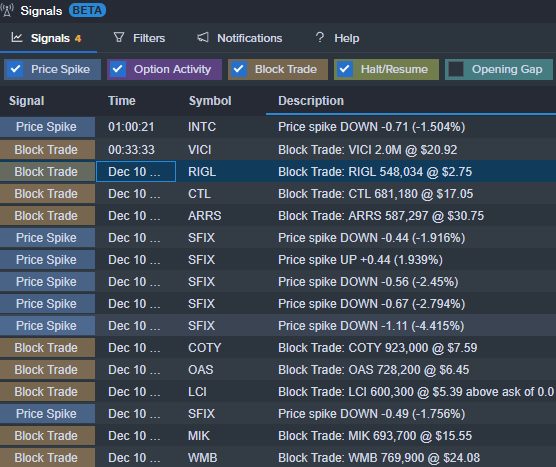
Let’s take a look at a block trade. A block trade is a massive amount of stock bought or sold. Block trades impact price, and you can take part in that price move or not, depending on the direction of the trade.
Block trades are specific, powerful trading strategies. Watch the block trades roll in, observe the direction, and make your trade. See a colossal block trade sell, buy Put Options, see a block trade buy, buy calls.
Exclusive CEO comments
Benzinga Analysts have frequent exclusive interviews with CEOs and publish exclusively critical comments that may provide key insights into a stock you own.
In-Person Event Coverage
When Benzinga has a reporter at a live earnings announcement event, you can hear directly from them. If you trade earnings, this is your ticket to sitting at the announcement event and getting analyst feedback; you do not need to wait for the earnings transcript.
Tutorial: How I Configure the Benzinga Newsfeed
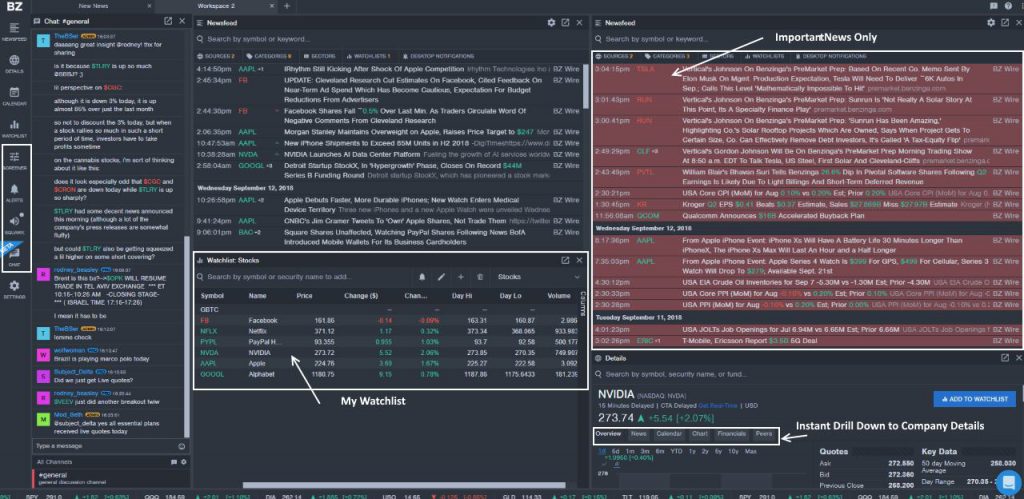
I have been using Benzinga PRO for five years; the news platform is exceptionally configurable and can run in multiple windows on multiple monitors. In the screenshot below, you can see how I have my Benzinga Pro interface configured.
- My Current Trades in the watchlist (middle white box)
- Important news only – I have configured the top right columns in red to show me the important, potentially market-moving news, which is a great feature.
- Instant Company Details Drill Down – Bottom Right for Financial News, Calendar & Charts
- Quick Access to Powerful Features – Stock Screener, Custom Alerts, Squawk Box, and Chat (Left-hand side)
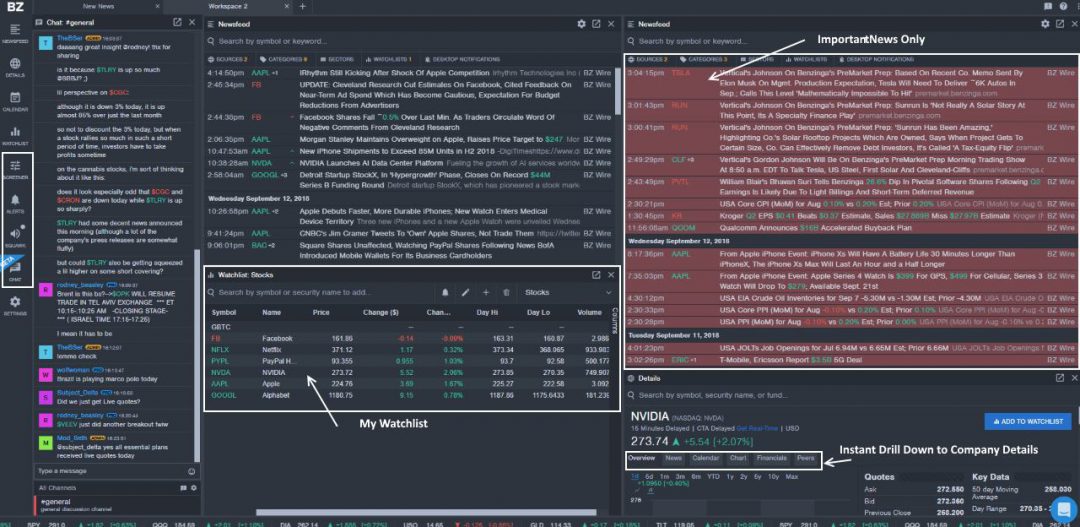
Benzinga Pro is extremely powerful yet easy to use, which is often a delicate balance to strike. To top it all off, they have also added real-time price quotes to the service, so you can see when news breaks and how it impacts the stock price.
Is Benzinga Pro the Best Day Trading News Feed?
Benzinga produces a lot of original news reporting, but it also partners with some of the best trading news feeds to provide complete data coverage to its customers. Reuters, FXStreet, Dxfeed, the New York Times, Seeking Alpha, Morningstar, Enin, and StockSnips are current tier-one partners.
Is Benzinga Reliable?
Yes, Benzinga Pro is a reliable, unbiased producer of real-time news. Having tested and used Benzinga Pro for many years, I have never questioned its reliability and availability during market trading hours. News alerts are delivered fast, and my email pre-market briefs always arrive on time.
Is Benzinga Pro Worth It?
Yes, Benzinga Pro is worth it if you are day trading real-time news events because fast access to market-moving news gives you an edge. Audio squawk box, news sentiment indicators, and real-time alerts are powerful features that enable you to act quickly to improve trading profits.
Try the Benzinga Pro Basic plan if you have only $5,000 or $10,000 to trade or invest. You will want to choose the Essentials plan if you have a more substantial portfolio with significant individual short-term trades.
If you are serious about trading in the stock market and need real-time access to the news that moves markets, Benzinga Pro is a realistically priced and extremely fast news service designed by traders for traders.
FAQs
Is Benzinga Options worth it?
Benzinga's options service is worth it if you are a serious options trader. Benzinga Pro offers an options trading audio squawk box, a news feed, and a live-streamed unusual options activity service that provides insights into huge market-moving options trades.
Is Benzinga reliable?
Having used Benzinga Pro for 5 years, I can confirm that Benzinga is a reliable and dependable service providing unparalleled coverage of trading activity for every trading day of the year.
How long is the Benzinga Pro free trial?
The Benzinga Pro free trial lasts 14 days and includes the full suite of Benzinga services, including real-time news, options activity, block trades, and audio news announcements.
How much does Benzinga Pro cost?
Benzinga Pro's premium services start at $27 per month for the newsfeed, chats, and movers lists. The top service tier is $117, including advanced filtering, block trades, insider trades, options squawk box, advanced chart screening, and watchlists. Use code "SMARTER" to get a 37% discount.
How to get Benzinga Pro free?
Benzinga Pro recently introduced a free service, so you can now get Benzinga Pro for Free, which includes the BZWire real-time services and market-moving stocks. Register for the free service on sign-up, or get your free premium service trial for 14 days.
How much is Benzinga Options?
The full Benzinga Options service costs $281 per month on an annual subscription and includes a full options trading training course, a private chat room with expert options trader Nic Chahine and the excellent Unusual Options Activity Alert Signals integrated into the Benzinga Pro app. Using code "SMARTER" you can get a 25% discount on your first year.
Is Benzinga legit?
Yes, Benzinga is a legitimate company in good standing with its customers. Benzinga Pro has a 4.2 star Trustpilot score and offers a unique streaming financial news service at a price point much lower than its competitors.
Who owns Benzinga News?
Beringer Capital, a private equity company, owns Benzinga. Jason Raznik founded Benzinga in 2010. In October 2021, Beringer Capital paid over $1 billion for a majority stake in the company. This values Benzinga at over $2 billion.
Is Benzinga good?
480 Trustpilot users rate Benzinga as better than good. Benzinga has a 4.2-star rating which translates to great. I have been a partner and user of Benzinga Pro for 5 years, and they are a reliable company offering an excellent service.
Is Benzinga trustworthy?
Benzinga has a trustworthy reputation amongst its customers; this can be seen in the Benzinga Pro app chat sessions and customer satisfaction ratings on Trustpilot.
Does Citadel own Benzinga?
Contrary to rumors, Citadel does not own Benzinga. Benzinga's majority stakeholder is Beringer Capital Management Inc, a private equity firm. Bering purchased a controlling stake in Benzinga in October 2021 for over $1 billion.
What is Benzinga Squawk?
Benzinga Squawk is the name of the breaking financial news audio stream available in the Benzinga Pro app. The Squawk is a live audio stream of breaking news designed to deliver real-time news even faster than reporters can type into the text newsfeed.
How accurate are Benzinga's analyst ratings?
Benzinga's analyst ratings listing is accurate. Benzinga does not perform analyst ratings; it simply receives a stream of the ratings performed by rating agencies.
How much does it cost to use Benzinga Pro?
Benzinga Pro is now free to use thanks to a new free service tier. Benzinga Pro Free provides the BZWire real-time newsfeed but without any filtering mechanism. So be prepared for more news than you can handle.
What are good alternatives to Benzinga Pro?
MetaStockR/T is a good alternative to Benzinga Pro. MetaStock also has real-time financial news but also better screening, charting, and backtesting. MetaStock Xenith does cost twice as much as Benzinga Pro.

Hi Jon, thanks for the input. I completely agree, Benzinga Pro’s news service and app are excellent.
Barry
I paid for yahoo finance and seeking alpha and finwiz and regret ever buy any of them after I tried benzinga pro I just love the sit up and the fast news I am hooked
I have been a benzinga pro user for years, and to be honest your review does not express how good it really is. By business is based on it
Hi Erik, I use the essential service, it can be overwhelming at first, as there are so many features, but it is worth it.
Barry
Great summary of the service, I really like the way to configure the importent news, I will be signing up for the essentials service, which service do you use?