
Finding a stock that is moving is easy. Finding it early enough to assess the setup and make a sensible decision is harder. That is where Trade Ideas earns my attention: its scanner, alerts, and AI signals put potential trades in front of me as the market moves.
My testing found a specialist platform for active US stock traders, with useful automation and a substantial learning curve. Whether it deserves a place on your desktop depends on how much you will use its scanning and strategy tools—and whether those tools justify the subscription.
My Trade Ideas Verdict
My published composite rating for Trade Ideas is 4.52. Its appeal is strongest for day traders who want real-time stock picks, specific AI-generated setups and the option to connect analysis with trade execution. I particularly value the way its scanning, visual stock races and trading signals help organize a busy market into candidates I can investigate.
The compromises matter. Charting is less comprehensive than I want for detailed discretionary analysis, and the desktop software takes time to learn. I would consider Trade Ideas for intense intraday workflow; I would find its cost harder to justify for occasional investing research. My rating assesses the software and its capabilities, and should not be read as a prediction of trading returns.
Trade Ideas Review Results & Ratings
My in-depth testing shows that Trade Ideas is the ultimate black-box, AI-powered day-trading signal platform with built-in automated bot trading. Three automated Holly AI systems pinpoint trading signals for day traders. Trade Ideas promises and delivers market-beating returns.
| Test | Tier | Score | Average |
|---|---|---|---|
| Lab Test Composite Score | AA | 4.52 | 4.21 |
| Pricing Index: $/day | A | $5.85 | $2.74 |
| Value Score (VP) | A | 4.03 | 2.82 |
| Speed & Ease of Use | AA | 4.50 | 4.50 |
| Chart Analysis Depth Index | C | 2.93 | 3.17 |
| Chart Pattern Depth & Accuracy | AA | 4.62 | 2.73 |
| Scanning Performance | B | 3.88 | 3.38 |
| Backtesting Performance | AA | 4.38 | 3.38 |
| Trading Bot & Auto-Trading Reliability | A | 4.00 | 2.50 |
| AI & Algo Index | AA | 4.50 | 2.00 |
| Alert Speed | A | 4.00 | 3.67 |
| Trade Signal Quality | AAA | 5.00 | 0.00 |
| Broker Connectivity & Ecosystem Depth | C | 2.40 | 1.55 |
| Portfolio Tool Performance | C | 2.10 | 2.80 |
| Financial News Speed & Depth | C | 1.00 | 2.30 |
| Community Utility Index (CUI) | AAA | 4.75 | 3.25 |
| Support Infrastructure & SLA Audit | AA | 4.50 | 3.75 |
How We Test Trading Tools: Rating system V3.
See the 2026 v3. 58-point Trade Ideas Lab-test and benchmarks.
Pros
✔ 3 AI Trading Algorithms That Beat the Market
✔ Get A Free Holly AI Stock Trade Every Week
✔ Fully Automated Backtesting
✔ Exceptional Stock Scanning
✔ Specific Audited Trade Signals
✔ Auto-trading & broker integration
✔ Auto-trade commission-free with eTrade integration
✔ Free Live Trading Room
Cons
✘ Old School User Interface
✘ No Mobile App

Trade Ideas is best for active US day traders seeking real-time AI-driven high-probability trades, excellent stock scanning, and a live trading room to learn trading techniques.
Save 28% on Trade Ideas Premium
Our 4.52 ⭐ Rated AI-Day Trading Tool
☆ Code "HOLLYOCT28" ☆
Deal Ends In:
Trade Ideas at a Glance
Trade Ideas offers hundreds of strategies, scans, and automated trading algorithms, along with audited performance results, to meet the needs of the most discerning traders.
My testing awards Trade Ideas an AA rating of 4.52 stars. Its stock scanner, alerting, and algorithmic trading signals are advanced and trustworthy. Brokerage Plus auto-trading is a great feature for experienced traders.
| ⚡ Features | Charts, Watchlists, Screening |
| 🏆 Unique Features | AI Trade Signals, Trading Room, Trading Competitions |
| 🎯 Best for | Active US stock traders who use scans and alerts throughout the session |
| ♲ Subscription | Monthly, Yearly |
| 💰 Price* | $89 | $178 |
| 🆓 Free Version | ✔ |
| 💻 OS | Web Browser, PC |
| 🎮 Trial | Free Live Trading Room |
| ✂ Discount | -15% Discount Code "LIBERATED" |
| 🌎 Region | USA |
| Why choose Premium? | Holly AI, backtesting, and auto-trading capabilities |
*Price is the annual plan monthly equivalent
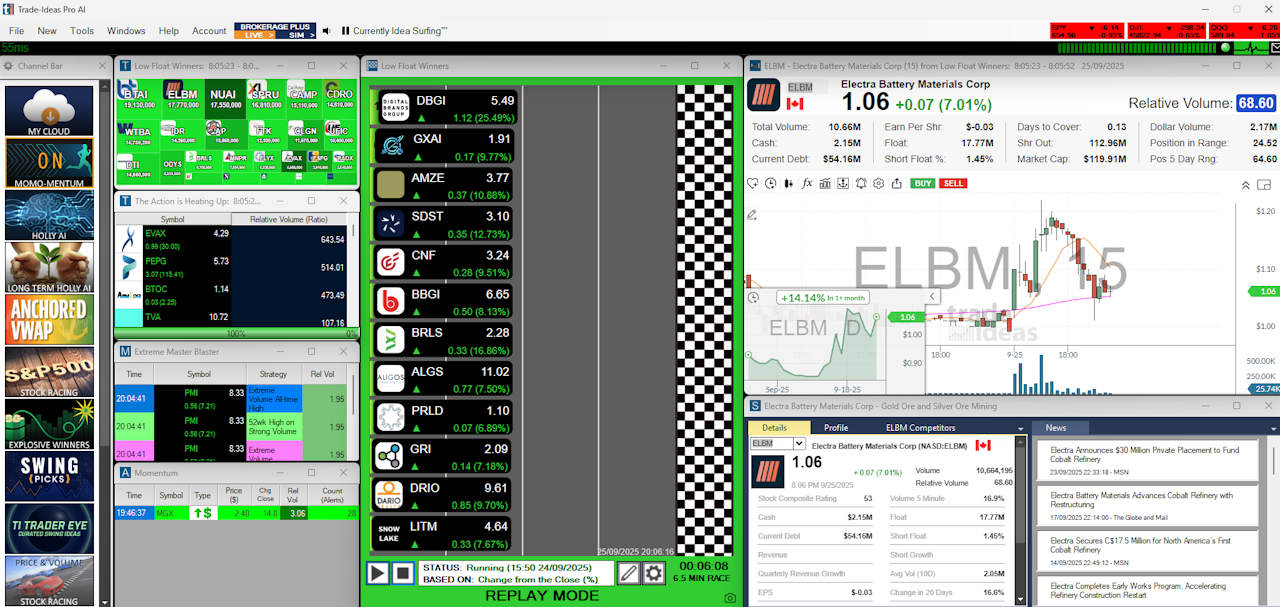
Screenshot Highlights




How I Tested Trade Ideas
My review draws on my published 58-point testing framework and the workflows documented in my screenshots and recordings: opening charts, changing symbols, scanning the market, examining signals, and exploring the platform’s research tools. Those examples show what I used and how the software presents information.
The feature ratings below summarize that assessment. My Trade Ideas lab report provides the detailed results, while my testing methodology explains the scoring framework. Examining software and signal displays is a different exercise from independently auditing the returns of a funded trading account.
My Video Review
What I Like & What To Watch Out For
1. Speed & Ease of Use: Web and Desktop
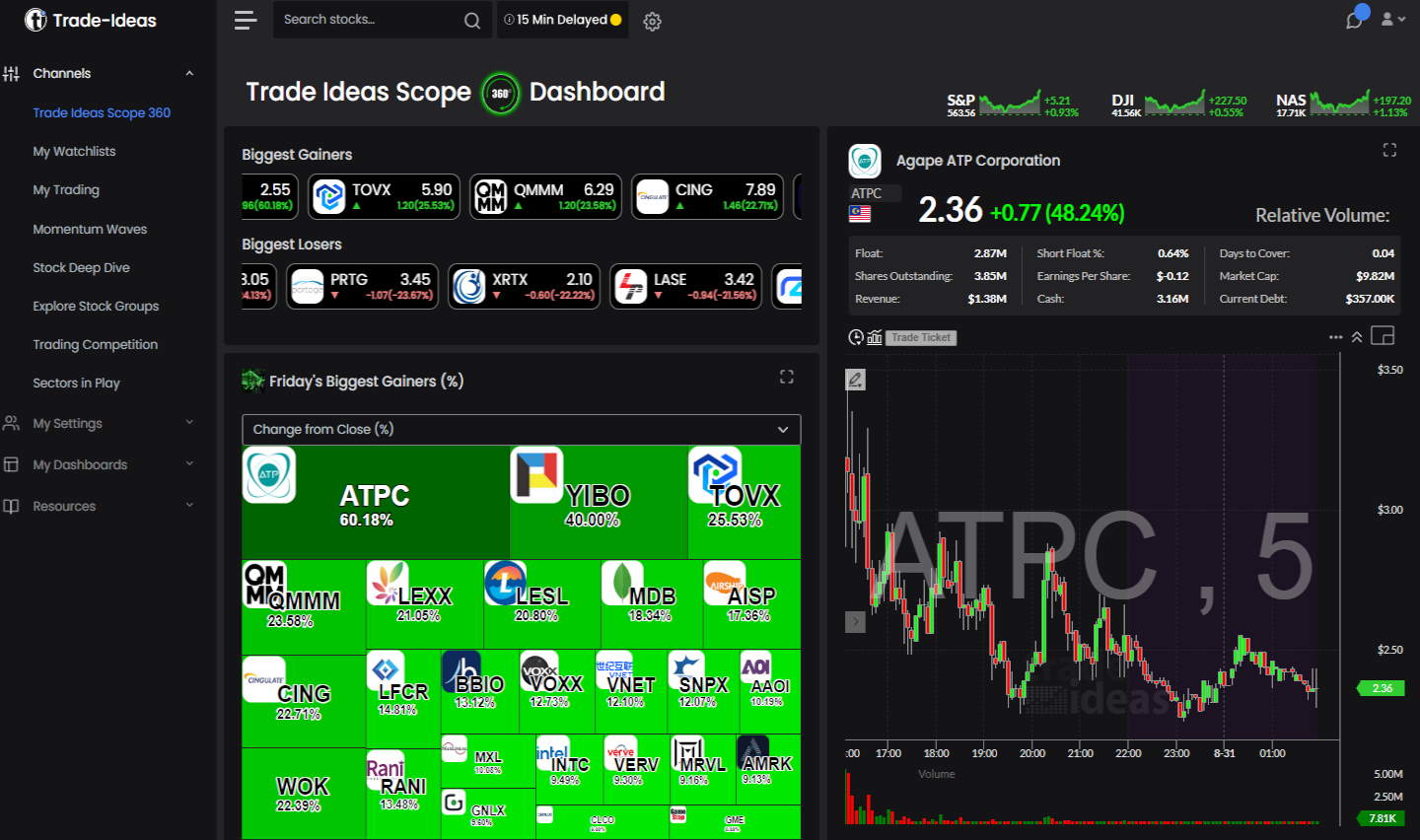
My speed and ease-of-use rating is 4.50. Scope 360 is a useful introduction to the platform: its visual presentation helps me get an overview before examining individual stocks. The desktop workspace offers more controls, but the number of windows and settings can make it feel overwhelming, so I would start with a small, relevant layout and expand it as needed.
Trade Ideas has two versions: a full-blown desktop platform and a lighter web version. The Trade Ideas web service can be accessed from any PC or Mac and contains most of the desktop platform’s functionality. Serious traders will want to download and install the desktop platform because it is endlessly configurable and multi-monitor-friendly.
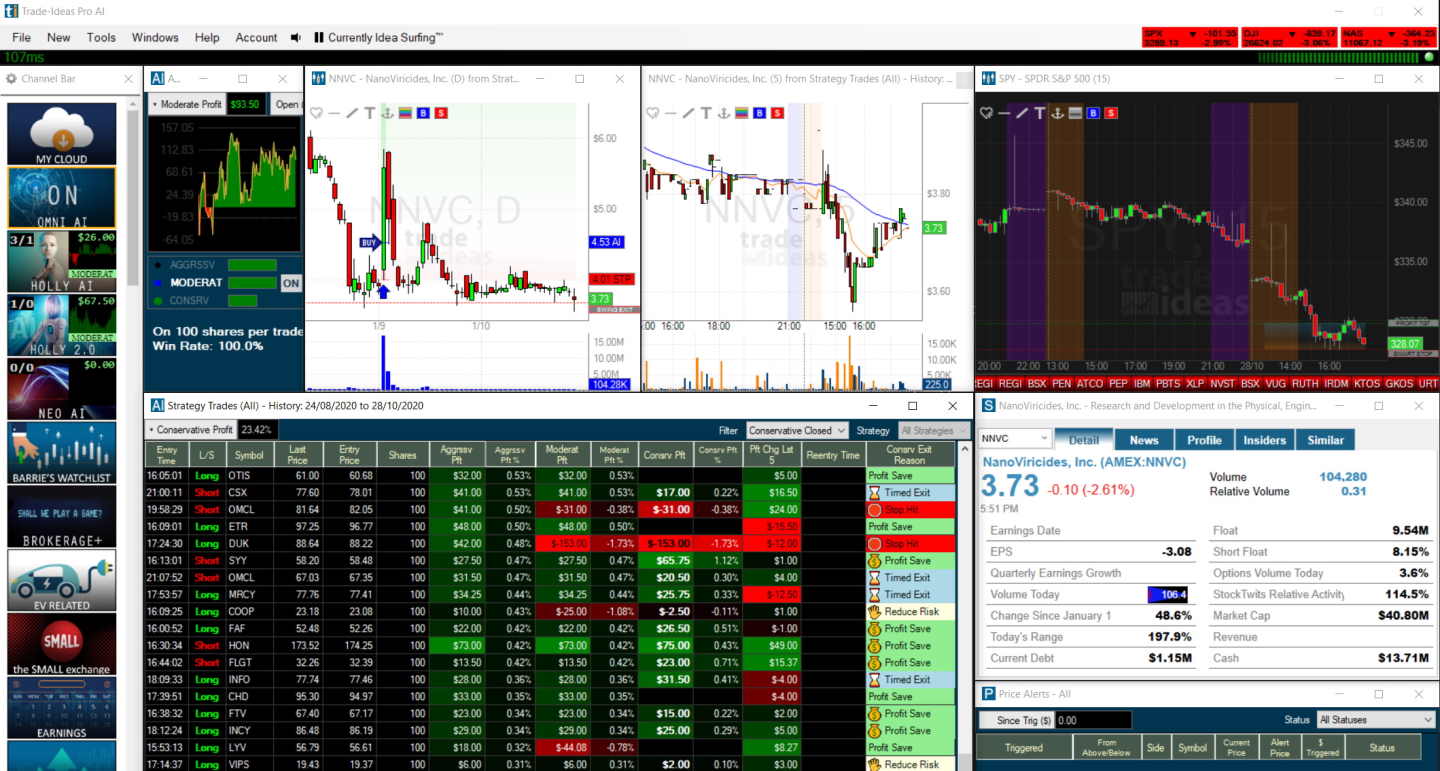
When you first open Trade Ideas on your desktop, the software feels a little clunky and unfriendly. Every element has its window, so if you want to resize the view, you need to resize all eight windows.
But there is a good reason for this design. It offers endless flexibility and window configuration options when using multiple monitors and large screens. Also, even though they are fully separate windows, they can be linked and unlinked to provide a fluid experience.
The interface is undergoing a huge transformation, making it more interactive and gamified, which is a welcome improvement.
2. Chart Patterns and Setup Recognition
My published pattern-depth and accuracy rating is 4.62. The practical appeal lies in the ability to use recognizable price behavior to identify trading candidates. A pattern becomes more useful when I can consider it alongside volume, price action, and the other conditions that brought a stock to my attention.
I would distinguish identifying a setup from predicting its outcome. A correctly identified breakout can still fail, and a pattern-recognition score does not describe the percentage of profitable trades. When assessing a candidate, I want to understand the condition that triggered it and what would invalidate the idea before acting.
3. Stock Scanner: Finding Opportunities in Real Time
My scanning-performance rating is 3.88. Scanning is one of the strongest reasons I would consider buying Trade Ideas. My existing tests include the unusual-volume scanner, Explosive Winners, and an S&P 500 scanning example. These show how the software can narrow a large market into stocks that deserve a closer look.
I also like Stock Racing as a visual way of following relative movement. Its usefulness comes from the decisions it helps me make: which stocks are becoming active, which deserve a chart review, and which can be ignored. The category score reflects the broader testing rubric; my buying judgment places particular weight on its usefulness during an active trading session.
Scanners, Alerts, AI Signals and Trading Bots: The Difference
| Tool | What it does | What remains for the trader |
|---|---|---|
| Scanner | Finds stocks matching selected conditions | Decide which candidates deserve investigation |
| Alert | Reports that a monitored condition has occurred | Assess its relevance and decide whether to act |
| Holly AI signal | Supplies a strategy-generated trade setup | Evaluate the setup and choose how to manage participation |
| Simulated trading | Models orders and positions without committing account capital | Compare the process with realistic execution constraints |
| Broker-connected automation | Sends orders through a configured, supported connection | Control size, permissions, exits, and supervision |
This distinction is central to choosing a plan. A scanner result can be useful without becoming a trade, and receiving an AI signal does not automatically mean an order has been placed.
4. Trade Ideas Backtesting: Developing a Repeatable Strategy
My backtesting-performance rating is 4.38. Trade Ideas’ OddsMaker lets traders evaluate configured strategies against historical market behavior without requiring them to build a separate backtesting program. I see this as an important step beyond collecting interesting scanner results: a repeatable set of conditions gives you something concrete to evaluate.
The Trade Ideas platform has a powerful, easy-to-use backtesting system that requires no programming knowledge. A point-and-click backtesting system is rare in this industry; the only other software with this capability is TrendSpider.
I ran many backtests with Trade Ideas, but the one I wanted to focus on was the “Unusual Social Mentions Scan”; it is a good test of the wisdom of crowds.
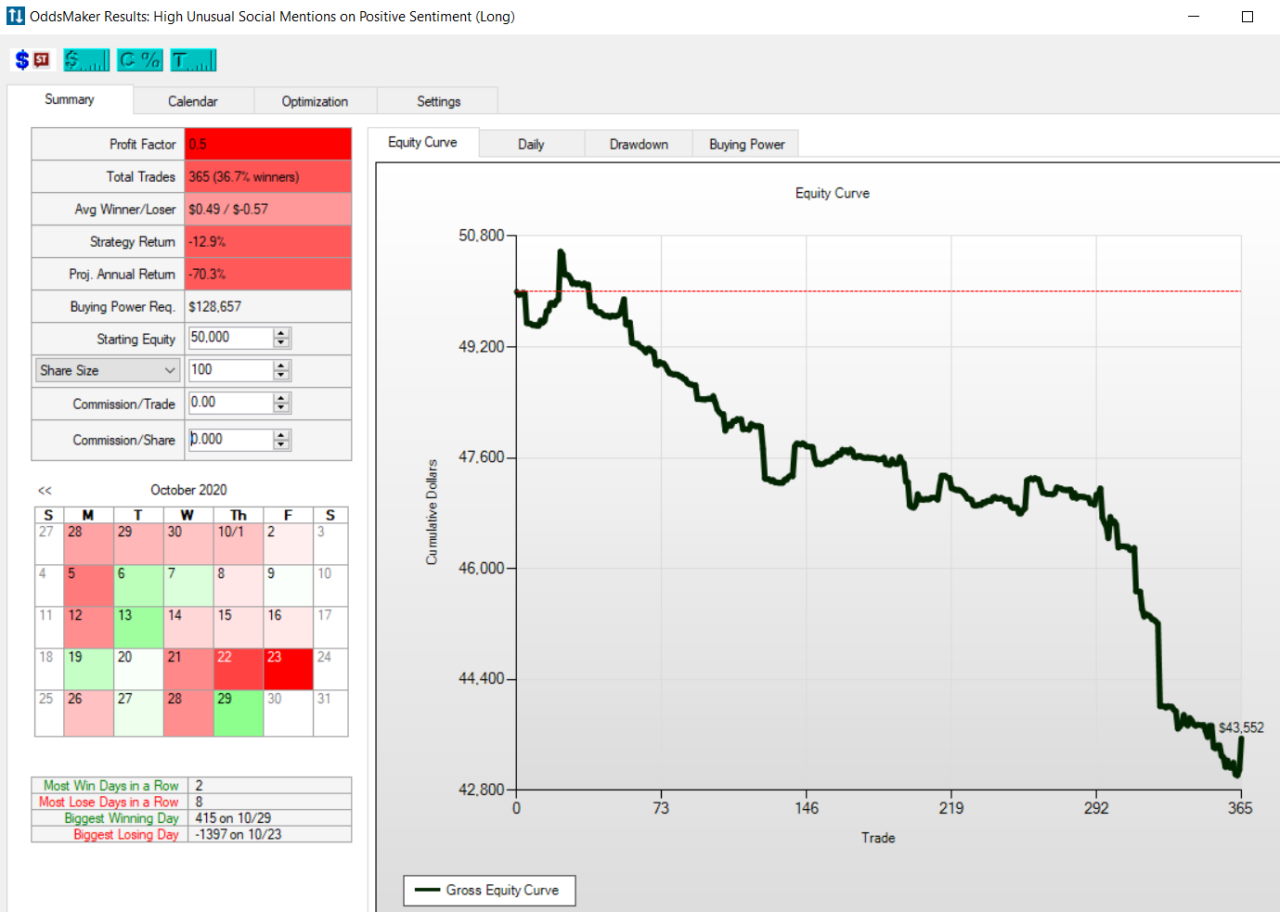
I wanted to focus on was a backtest of the “Unusual Social Mentions Scan”. This is a good test of the wisdom of crowds.
As you can see in the backtest results above, the crowds are not very wise, as the system loses 70% per year. This helps me draw three conclusions.
- Do not listen to people on social media.
- Trade Ideas provides excellent, unique insight into stock market crowd sentiment.
- You may have a winning system if you do the opposite of what people suggest on StockTwits.
| Tool | Backtesting | No-Code Backtesting | Auto-Trading | Ranking |
|---|---|---|---|---|
| Trade Ideas | ✔ | ✔ | ✔ | #1 |
| TrendSpider | ✔ | ✔ | ✔ | #1 |
| TradingView | ✔ | ✘ | ✔ | #2 |
| Stock Rover | ✔ | ✘ | ✘ | #3 |
| MetaStock | ✔ | ✘ | ✘ | #3 |
5. Trade Ideas AI: Holly and Money Machine
My AI and algorithmic-analysis rating is 4.50. Holly is the feature I would investigate first when deciding whether Premium is worthwhile. It supplies strategy-generated stock suggestions with entries, stops, and targets, allowing a trader to examine a defined setup. Trade Ideas’ guide also makes clear that Holly’s own algorithms are not customizable. How Holly works
That matters when comparing platforms. A trader who wants ready-made setups has a different requirement from someone who wants to design every strategy rule. My interest in Holly is whether its ideas improve the selection process and can be evaluated consistently. I would judge it by the usefulness and transparency of those outputs, as well as the effort and cost of incorporating them into a trading routine.
Trade Ideas Holly AI ranks #3 for best daily stock picking services.
Trade Ideas Channels
Trade Ideas offers over 30 curated channels that highlight theme-based trading opportunities the team believes present outsized profit potential. The channels cover social media buzz, earning opportunities, and multiple industry plays.
Above, you can see many of the Trade Ideas channels, each with a unique, custom view tailored to the trading situation. Channels include Holly AI, Anchored VWAP, S&P 500 VWAP, Swing Picks, Price and Volume, Premarket, and After Hours.
Money Machine: Check the Current Release Before Buying
Trade Ideas also offers Money Machine, a separate momentum-focused feature. Its official feature page currently describes an alpha release for Premium subscribers, available only in simulated mode. It describes automated entry into momentum opportunities, with traders involved in managing the positions. Official Money Machine release information
I would treat that as a feature to explore in simulation. Do not infer from its name or promotional demonstrations that it offers unattended live-account trading. The release status and supported execution mode are part of the buying decision, particularly if automation is your main reason for upgrading.
6. Holly AI Performance: What the Trade Signals Tell You
My published trade-signal category rating is 5.00. The aspect I value is the specificity of the output: a visible setup can be examined against the chart and followed through to its exit. That is useful for understanding how a strategy behaves, but the category rating should not be interpreted as a win rate or an independently verified return forecast.
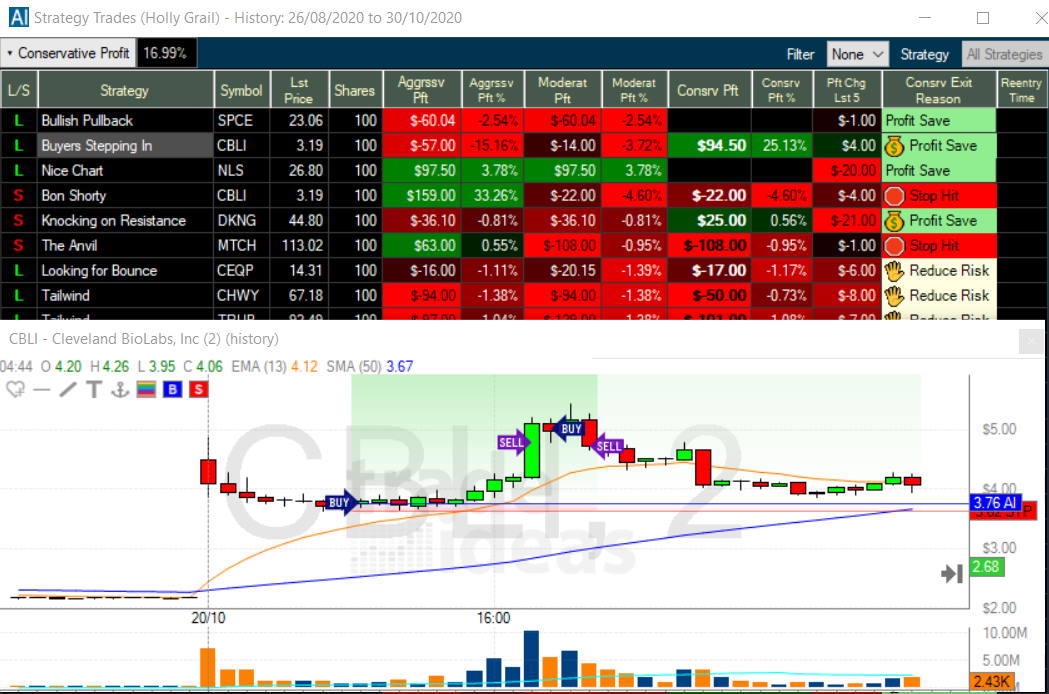
While testing Trade Ideas, I was impressed by how Holly AI visually shows every buy and sell signal on a chart. The charts display both in-play and historical trades, making it easy to understand the strategy and potential.
I have highlighted a trade Holly AI (Holly Grail) recommended in the chart below. This trade for Cleveland Biolabs (Ticker: CBLI) made a 25% profit within 4 hours. Note how the buy and sell signals are depicted on the chart.
Holly AI
Trade Ideas Holly AI services institutions and retail investors, recommending 3 to 10 trades per day, lasting from a few minutes to a few hours. Holly AI returns at least 20% per year without leverage and has beaten the market over the last three years.
- Trade Ideas has large institutional clients and is a legitimate business.
- Trade Ideas recommends about 3 to 10 trades per day.
- Each trade duration is from a few minutes to a few hours.
- You must be an active day trader to take advantage of Trade Ideas.
- Trade Ideas returns approximately 20% per year.
- Trade Ideas has beaten the S&P 500 over the last 4 years.
- You must be able to go short and long to take advantage of the trading strategies.
- Depending on your leverage, trading style, and the trades you take, you could make more than 20% or even incur a loss.
- You must maintain a minimum balance of $25K in your brokerage account to actively engage in pattern day trading in the USA.
Holly AI Performance
Upon downloading and analyzing 65 days of trades, I can confirm the performance numbers claimed by Trade Ideas. Trade Ideas Holly AI’s performance is publicly available and impressive.
To assess a system’s performance, one must compare it to an underlying benchmark. Holly Grail AI has outperformed the S&P 500 by 10% since 2019, and Holly 2.0 beat the market by 31%.
| Holly AI Performance | Starting Capital Jan 2019 | Ending Capital Oct 2020 | Total Return | % Per Year |
| Holly Grail (AI) | $50,000.00 | $71,186.00 | 42% | 23% |
| Holly 2.0 | $50,000.00 | $80,510.00 | 61% | 33% |
| Holly Neo | $50,000.00 | $71,186.00 | 42% | 23% |
| S&P 500 | $50,000.00 | $66,000.00 | 32% | 17% |
Table: Independent Performance Audit: Comparing $50,000 invested in the S&P 500 versus day trading with Trade Ideas.
Interestingly, Holly did not suffer the huge losses incurred in the S&P 500 during the Corona Crash from March to April 2020 or 2022.Holly 2.0
Holly 2.0 is a more aggressive version of Holly AI, presenting more aggressive day trading scenarios for you to select. Trade Ideas operates three key trading styles with each AI algorithm: conservative, moderate & aggressive. Holly 2.0 is aggressive.
Holly Neo
Holly NEO is a newer AI that seeks to trade real-time chart patterns. It utilizes a mix of long and short trades based on stock price pullbacks and breakouts.
- Pullback Long: This strategy identifies trades in which the stock price is down and seeks to move up on higher volume.
- Breakout Long – Stock price breaks out through a key resistance or to new highs.
- Pullback Short – identifying a short pullback opportunity in price.
- Breakdown Short – a shorting opportunity where upward momentum breaks down.
To assess Holly AI performance, I would want the full sequence of trades, including losses, the period covered, position-sizing assumptions, and the basis of execution. Trade Ideas explains that reported portfolio results may differ from a subscriber’s experience due to commissions, liquidity, timing, and available capital. Selected winning examples cannot establish the return a reader would have earned. Trade Ideas performance disclosure
7. Trade Ideas Trading Bots and Brokerage Plus Automation
My trading-bot and auto-trading reliability rating is 4.00. Brokerage Plus is relevant when you want to connect a defined trading process to execution. The benefit is consistency: configured orders can reduce the manual steps between an eligible setup and an action. Whether a particular strategy-broker combination supports the desired workflow needs to be verified before enabling it.
I would begin with Trade Ideas’ simulator to understand entries, exits, and position handling, then examine the differences a live connection introduces. Trade Ideas documents manual methods for trading Holly’s signals in simulation, including its order-entry panel and charts. That provides a useful way to learn the process before adding more automation. Official simulator instructions
8. Community and Trading Room
My community-utility rating is 4.75. The trading room is a useful part of the overall offering because it provides an opportunity to see how market activity is discussed and interpreted. For complex software, observing a process can help connect individual features with the decisions they support.
I would use community resources to learn the platform, compare approaches, and ask better questions about my own setup. A room participant’s trade is still their decision, made in their circumstances. The educational value is strongest when you understand the reasoning and can decide whether it applies to your own process.
9. Trade Ideas Support and Learning Resources
My support-infrastructure rating is 4.50. Detailed guidance becomes especially useful when moving from chart viewing to strategy configuration and broker connections. Trade Ideas’ documentation provides a starting point for understanding how the modules fit together and how to operate them.
I would make practical use of those resources during evaluation: build the layout you need, configure an example strategy, and resolve any connection questions. That is more revealing than simply browsing a feature list. My rating is an assessment of the support offering, not a promise of a specific response time for every inquiry.
Charts and Technical Analysis
My chart-analysis depth rating is 2.93. I use the charts here to investigate scanner results and put trading signals into context. They help answer practical questions about a candidate: where price is moving, how volume is behaving, and where the proposed entry sits relative to recent activity.
The one area in which I felt let down was the ability to perform my own technical analysis. Most technical analysis software, backtesting, and charting platforms offer at least 50 different technical analysis tools. Trade Ideas does not play that game; it offers only volume, moving averages, VWAP, and trendlines.
The lack of indicators is not a good look for Trade Ideas compared to MetaStock, which offers over 300 indicators and drawing tools, and TradingView, which offers 160 indicators and chart types. To counter that argument, one could suggest that the design remit removes the need for you to perform your own technical analysis by running all the backtests and finding all the opportunities for you, which is unique.
In any case, a few more technical analysis tools would help improve the product.
| Technical Charting | Rank | Chart Types | Indicators |
| TradingView | #1 | 21 | 400 |
| MetaStock | #2 | 15 | 300 |
| TrendSpider | #3 | 12 | 140 |
| Finviz | #4 | 5 | 125 |
| Trade Ideas | #5 | 6 | 80 |
My testing gives charting less credit than Trade Ideas’ specialist trading features. If detailed chart construction and broad technical analysis are central to your process, compare the experience with my TradingView review. For Trade Ideas, the purchase decision should depend primarily on how effectively its discovery and signal tools support your trading.
Broker Connections and Ecosystem
My published broker-connectivity rating is 2.40, reflecting the ecosystem assessed in the lab report. The current official broker page lists API integrations for TradeStation, Interactive Brokers, E*TRADE and Alpaca. It separately labels Moomoo, Centerpoint Securities and Cobra Trading as partnerships. Those categories should be kept distinct when comparing platform access with order-execution capabilities. Official broker connections
| Tools | Autotrading Bot Integration | Brokers Integrated | Exchanges | Ranking |
| Trade Ideas | ✔ | 4 | USA | #1 |
| TradingView | ✘ | 50 | Global | #1 |
| TrendSpider | ✔ | 35 | USA | #2 |
| MetaStock | ✘ | 0 | Global | #4 |
My practical advice is to start with your intended broker and work backward. Check the connection instructions, supported order types, and the features available to your account. A broker logo alone does not establish that every Trade Ideas strategy can be automated through that relationship. The connection needs to support the way you actually intend to trade.
Financial News
My financial-news rating is 1.00. Within my review framework, news coverage is a weaker part of the package. I would buy Trade Ideas for its market discovery and trading tools, and assess separately whether its available news information is sufficient for my research.
This is particularly relevant when a scan surfaces a stock making an unusual move. Finding the move and understanding its cause are two different tasks. If your decisions depend heavily on catalysts, make sure you have a reliable way to investigate the event before acting on the scanner result.
Portfolio Tools
My portfolio-tool rating is 2.10. Trade Ideas is a more natural fit for finding and managing trading opportunities than for evaluating a long-term investment portfolio. I would not choose it primarily for retirement planning, income analysis, or an extensive review of portfolio fundamentals.
That keeps the recommendation focused. An investor who checks holdings occasionally may find little reason to pay for an intraday scanning service. A frequent trader can value those same capabilities highly. Compare tools against your actual research and trading requirements using my Smart Trading Tools Finder.
Trade Ideas Pricing: Is Standard or Premium Better Value?
Standard is the plan I would examine if real-time scanning is the main requirement. Premium becomes more relevant when Holly AI, backtesting, and auto-trading capabilities are integral to the intended workflow. At the reference prices above, Premium costs twice as much as Standard, so the additional features need to earn their place in your routine.
For a fuller comparison of monthly and annual costs, offer eligibility and partner savings, read my Trade Ideas pricing and discounts guide. I would first identify the necessary capabilities and then compare the available offers. That makes it easier to judge value without being distracted by a temporary discount.
Is Trade Ideas worth it?
My published Trade Ideas value score is 4.03. I can see the justification for the subscription when scanning, reviewing setups, and developing strategies are regular parts of the trading day. The value comes from the work the software helps you perform and the quality of the decisions it supports.
I find it harder to justify for someone who mostly wants occasional stock ideas or a few charts. Before paying annually, identify the tasks you expect to perform each week and which require the paid tier. A useful tool can save research effort, but the subscription itself does not create a profitable trading strategy.
Broker connections and a trading community that enhances the platform’s usefulness. It is worth considering for active US stock traders who regularly use scanning, alerts, and strategy tools. My recommendation becomes less compelling when those capabilities would be used infrequently or when detailed long-term investment research is the main requirement.
My Final Recommendation
Trade Ideas deserves a place on the shortlist of an active stock trader who wants a structured way to find opportunities and evaluate strategies. My strongest reasons to consider it are its scanning workflow, specific AI signals, and the ability to progress from research into simulation and supported execution.
Choose Standard when scanning meets the requirement. Consider Premium when you will regularly use its strategy and AI capabilities. Take time to learn the software, examine the evidence behind the signals, and assess the cost relative to your actual usage.
Compare Trade Ideas plans and current discounts
Explore the Trade Ideas lab results and methodology
FAQ
Is Holly AI included in Standard?
Holly’s first-generation AI signals are in Premium. Standard focuses on real-time data, scanning, and related trading tools. Check the current feature comparison when choosing a subscription.
Does Trade Ideas automatically trade for you?
It offers auto-trading capabilities, but execution depends on configuration and a supported connection. A scan or signal does not place an order by itself. Money Machine’s official alpha description currently specifies simulated mode only.
Can I use Trade Ideas in a browser?
Trade Ideas has a web experience as well as desktop software. Check that your required features are available in the version you intend to use; browser access should not be taken to mean complete desktop feature parity.
Does Holly AI guarantee profitable trades?
No. Its signals provide setups for evaluation, and reported results may differ from actual account outcomes. Assess the full trade record and execution assumptions before concluding performance examples.
Trade Ideas or TradingView?
My preference depends on the task. I would investigate Trade Ideas for its specialized stock scanning and AI signal workflow. I would compare TradingView when charting is the main priority. My TradingView vs. Trade Ideas review explains the rationale behind that decision.
