
StockCharts earned a Lab Test Composite Score of A 4.14, putting it just under the market median (4.21) in a 17-category benchmark.
This 58-point scientific StockCharts lab test, audit, and benchmarking covers speed, accuracy, value, and feature depth, delivered with data-driven precision.
The key takeaway: StockCharts is strongest when you want serious, technician-first charting, custom scans, and a high-signal community, but it trails modern platforms in AI, broker integrations, real-time news, and native strategy backtesting.
Verdict
StockCharts.com is a specialist technical analysis platform that shines when your edge comes from repeatable chart-and-scan workflows. It’s not a modern “everything app,” and our scores reflect that: excellent scanning and community, good chart depth, fair pricing—offset by weak news, limited ecosystem connectivity, no backtesting, no broker trading, and minimal AI.
If you’re a serious technician (swing, position, systematic discretionary), StockCharts can be a core tool—just plan on pairing it with a broker and, depending on your style, a news and/or backtesting platform.
Composite Lab Performance Score
At A 4.14, StockCharts lands just below the median (4.21). That’s exactly what I expect from a specialist platform: it excels in technician workflows (chart depth, scanning, community), but loses points in the “modern stack” (AI layer, broker ecosystem, real-time news, backtesting).
Who this is for: traders/investors who make decisions from chart evidence and repeatable technical rules.
Who won’t love it: traders who want “all-in-one” (news + execution + automated strategies + AI copilots) in a single platform.
| Metric | Calculation | StockCharts | High | Median | Low | Category Winner |
|---|---|---|---|---|---|---|
| Composite Lab Performance Score (CLPS) | Avg ratings + 5X superpower boost | 4.14 | 4.75 | 4.21 | 2.93 | TradingView |
| Composite Lab Performance Score (CLPS) Overall Test Winners | TrendSpider 4.72 | Trade Ideas 4.52 |
In Context: StockCharts plays the long game: it’s built around structured chart workflows (SharpCharts/ACP), disciplined scan logic, and technician community patterns—not hype features.
In practice, that means you can build a repeatable “chart → scan → confirm → alert” process that doesn’t depend on constant newsflow or flashy AI. The tradeoff is you’ll likely pair it with something else for execution, fundamental research, or real-time headlines.
Benchmarked Lab Scores
| Test | Tier | Score | Average |
|---|---|---|---|
| Lab Test Composite Score | A | 4.14 | 4.21 |
| Pricing Index | A | $1.97/day | $2.74/day |
| Value Score (VP) | C | 1.89 | 2.82 |
| Speed & Ease of Use | AA | 4.33 | 4.50 |
| Chart Analysis Depth Index | A | 4.17 | 3.17 |
| Chart Pattern Depth & Accuracy | C | 2.09 | 2.73 |
| Scanning Performance | B | 3.81 | 3.38 |
| Backtesting Performance | N/A | N/A | 3.38 |
| Trading Bot & Auto-Trading Reliability | C | 1.50 | 2.50 |
| AI & Algo Index | C | 1.00 | 2.00 |
| Alert Speed | B | 3.67 | 3.67 |
| Trade Signal Quality | C | 0.00 | 0.00 |
| Broker Connectivity & Ecosystem Depth | C | 1.55 | 2.00 |
| Portfolio Tool Performance | C | 2.80 | 2.80 |
| Financial News Speed & Depth | C | 0.50 | 2.80 |
| Community Utility Index (CUI) | B | 3.75 | 3.25 |
| Support Infrastructure & SLA Audit | B | 3.00 | 3.75 |
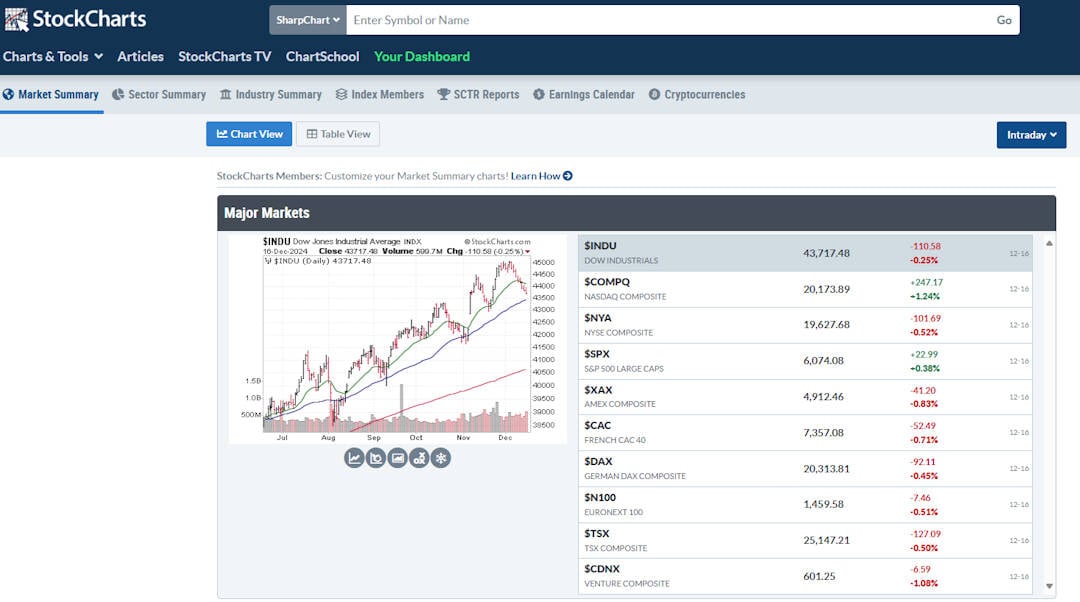
StockCharts is a technical analysis workstation (charts, scans, alerts, pattern tools).
Reasons to Consider StockCharts
- Scanning is genuinely strong: low latency, solid speed, and support for custom code scanning for technicians.
- Charts are technician-first: broad chart types, solid indicator depth, fast time-to-chart, and structured workflows (templates, lists).
- Community quality is high: you get real technical IP and learning benefits—not just chatter.
- Pricing is reasonable relative to the median cost/day and $/feature for the capabilities you actually use.
Reasons to Avoid / Pair With Another Tool
- No native backtesting: pair with a dedicated backtester if you’re rules-based.
- Weak real-time news: pair with a news terminal if you trade catalysts.
- Low AI/automation: if you want AI copilots or bot execution frameworks, use a platform built for that.
- Broker integration is minimal: treat StockCharts as analysis; execute elsewhere.


Pricing Index
This category is now dollar-based (not 0–5). StockCharts comes in at $1.97/day, below the median $2.74/day, so pricing is a relative strength. The bigger question is whether you need the Pro + real-time package to unlock the workflows you want (alerts, scans, more advanced charting).
| Metric | Calculation | StockCharts | High | Median | Low |
|---|---|---|---|---|---|
| Cost-per-day | $/day annual, min viable w/ real-time | $1.97 | $9.99 | $2.74 | $0.74 |
| $ per feature | EMC / total features | $5.45 | $23.37 | $5.95 | $1.94 |
| Effective Monthly Cost (EMC) | Plan + data + key add-ons/month | $59.90 | $303.87 | $83.32 | $22.50 |
In Context: StockCharts pricing tends to feel “fair” if you actually use the scanning and chart workflows. If you only need occasional chart checks, free chart sites will suffice.
But if you’re actively running scans, managing alert sets, and reviewing chart lists daily, the subscription becomes an efficiency tool: it reduces friction and keeps your process consistent. The value is strongest for routine-driven traders who open charts every day and want a stable platform.
Value Score (VP)
StockCharts posts 1.89 vs the 2.82 median. That’s not because it’s weak technically—it’s because the Value Score rewards breadth/depth of “all-in-one” features and device support. StockCharts is deep in technical analysis, but it doesn’t try to be a complete research terminal or brokerage ecosystem.
| Metric | Calculation | StockCharts | High | Median | Low |
|---|---|---|---|---|---|
| Value Score | Weighted sum (quality/depth/devices) | 1.89 | 4.37 | 2.82 | 1.70 |
| Value Rank | Percentile ranking | 1.00 | 5.00 | 2.50 | 1.00 |
| Feature Quality | Avg feature quality ratings | 2.31 | 4.16 | 2.97 | 2.00 |
| Feature Breadth | Count of meaningful core features | 11 | 17 | 12 | 9 |
| Feature Depth | Percentile ranking | 1.00 | 4.75 | 3.00 | 1.00 |
| Device Support Depth | Web/PC/iOS/Android | 2.00 | 5.00 | 2.00 | 1.00 |
| Value Score Test Winners | TrendSpider 4.20 | Trade Ideas 4.05 |
In Context: The value story here is “depth over breadth.” If you judge StockCharts by whether it replaces a full-stack platform, you’ll feel the gaps. If you judge it as a technician’s toolkit—fast chart creation, repeatable scan logic, robust chart types, and a learning-rich community, value improves dramatically.
StockCharts is at its best when paired with a broker (for execution) and, optionally, a separate research/news source.
Speed & Ease of Use
At 4.33, StockCharts is slightly under the 4.50 median but still strong. The standout is Time-to-Chart (5.0 points) and the 3-click rule (5.0). The friction is multi-chart latency (379 ms) and a more “workflow-driven” UI that rewards familiarity.
| Metric | Calculation | StockCharts | High | Median | Low |
|---|---|---|---|---|---|
| Speed & Use Index Rating | Avg of time-to-chart, multimonitor, 3-click | 4.33 | 5.00 | 4.50 | 3.30 |
| Time to Chart Speed (Seconds) | Load time w/ 200 bars + indicators | 3.89 | 17.03 | 4.70 | 1.60 |
| Time to Chart Performance | Points from load-time rubric | 5.00 | 5.00 | 4.50 | 3.00 |
| Multi-Chart Latency (ms) | Sync/latency measurement | 203 | 667 | 209 | 10 |
| Multimonitor Chart Speed | Points from sync rubric | 3.00 | 5.00 | 3.50 | 0.00 |
| 3-Click Rule Test | Clicks to place trade/launch scan | 3 | 6 | 3 | 2 |
| 3 Click Rule: Ease of Use | Points (penalty beyond 3 clicks) | 5.00 | 5.00 | 3.00 | 2.00 |
| Speed & Ease of Use Test Winners | Stock Rover 5.00 | Seeking Alpha 5.00 | TrendSpider 4.67 |
In Context: StockCharts speed matters most in “high repetition” workflows: you’re clicking through chart lists, checking setups, and iterating on scans. Shaving seconds off each chart view adds up quickly.
The platform also encourages a structured routine—prebuilt chart styles, saved lists, and scan workbenches—so the UI becomes faster over time. If you’re brand new, it can feel old-school; if you’re systematic, it feels like a cockpit.
Chart Analysis Depth Index
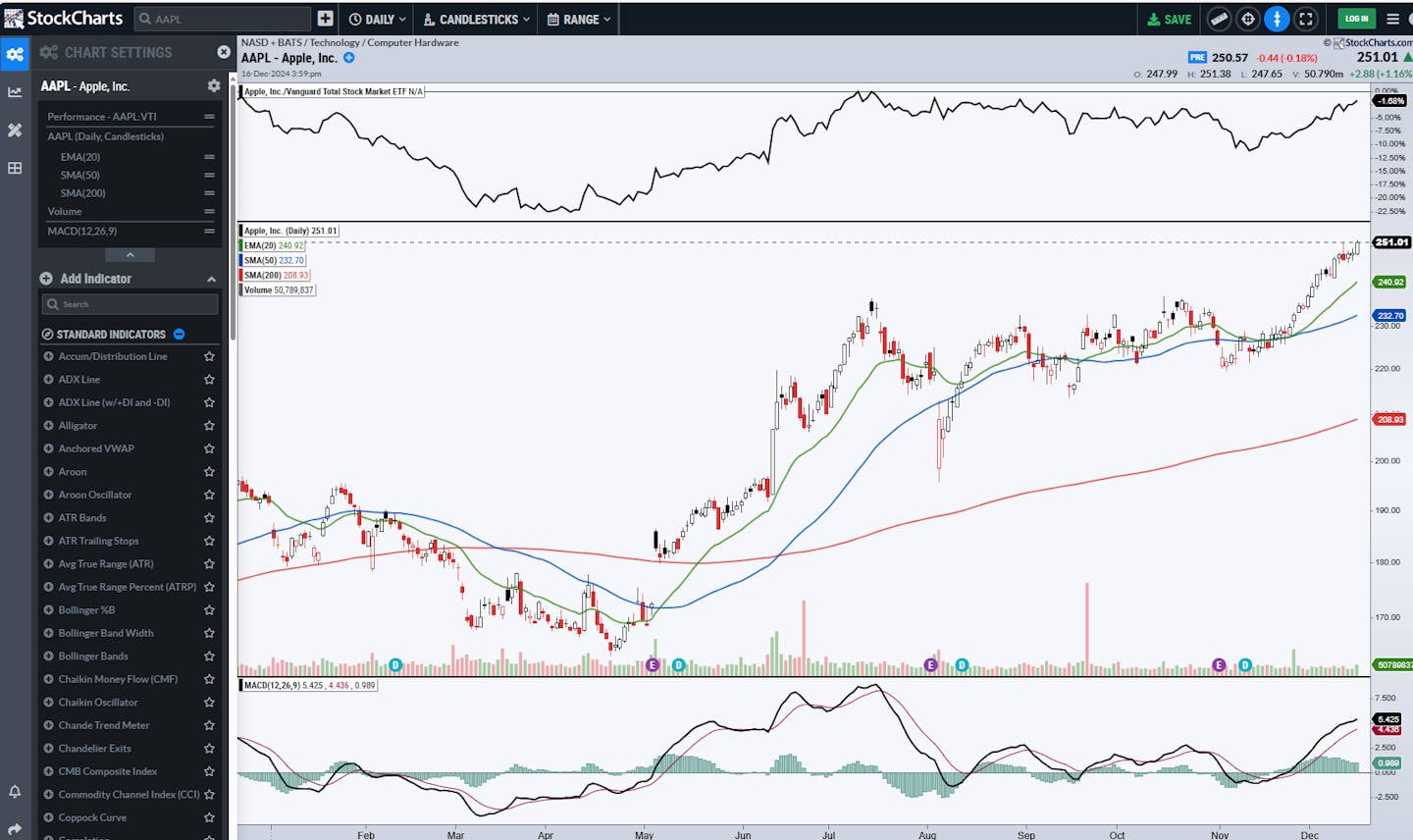
StockCharts scores A A vs the 3.17 median. It’s strong on chart variety and indicators, but it loses heavily on custom indicator coding (0.0)—a major differentiator vs modern charting ecosystems.
| Metric | Calculation | StockCharts | High | Median | Low |
|---|---|---|---|---|---|
| Chart Analysis Depth Index | Avg of chart depth, indicators, coding | 4.17 | 5.00 | 3.17 | 0.50 |
| Chart Types | Count | 21 | 38 | 10 | 1 |
| Chart Depth | 0.3 points per chart type | 4.00 | 5.00 | 3.00 | 0.30 |
| Indicators | Count | 140 | 400 | 116 | 0 |
| Indicator Depth | 0.025 points per indicator | 3.50 | 5.00 | 2.90 | 0.00 |
| Custom Indicator Coding | Available = 5 points | 5.00 | 5.00 | 0.00 | 0.00 |
In Context: StockCharts is a pioneer in web-based charting and remains a standout for technicians who want clean, information-dense visuals (especially with SharpCharts and ACP). But the “modern edge” in charting increasingly comes from user-created indicators, shared scripts, and rapid experimentation—areas where StockCharts is intentionally constrained. If you trade standard technical frameworks, that’s fine. If your style relies on custom scripting, you’ll feel constrained.
Chart Pattern Depth & Accuracy
At 2.09, StockCharts trails the 2.73 median. Depth is moderate (51 patterns). This makes pattern tools “supportive,” not authoritative—use them to shortlist candidates, not to decide trades.
| Metric | Calculation | StockCharts | High | Median | Low |
|---|---|---|---|---|---|
| Pattern Recognition Efficacy & Accuracy | Avg of depth + accuracy scores | 2.09 | 4.88 | 2.73 | 0.00 |
| Total Patterns | Count | 51 | 226 | 57.5 | 0 |
| Pattern Recognition Depth | 0.33 points per pattern | 1.68 | 5.00 | 1.90 | 0.00 |
| Candle Patterns Recognized | Count | 19 | 172 | 22.5 | 0 |
| Price & Trend Patterns Recognized | Count | 32 | 54 | 24 | 0 |
| Accuracy | % accurate | 50% | 95% | 89.5% | 0% |
| Pattern Recognition Accuracy | 0.05 points per % accurate | 2.50 | 4.75 | 4.48 | 0.00 |
| Chart Pattern Recognition & Accuracy Test Winners | TrendSpider 4.88 | Trade Ideas 4.62 |
In Context: StockCharts’ pattern utility is best thought of as “pattern awareness,” not “pattern trading.” It’s helpful when you want quick visibility into possible formations—especially when combined with strong chart templates and scan filters.
But the workflow still belongs to you: confirm with multi-timeframe context, support/resistance logic, volume behavior, and broader trend strength. If you expect automated pattern signals to be a strategy on their own, this isn’t that tool.
Scanning Performance
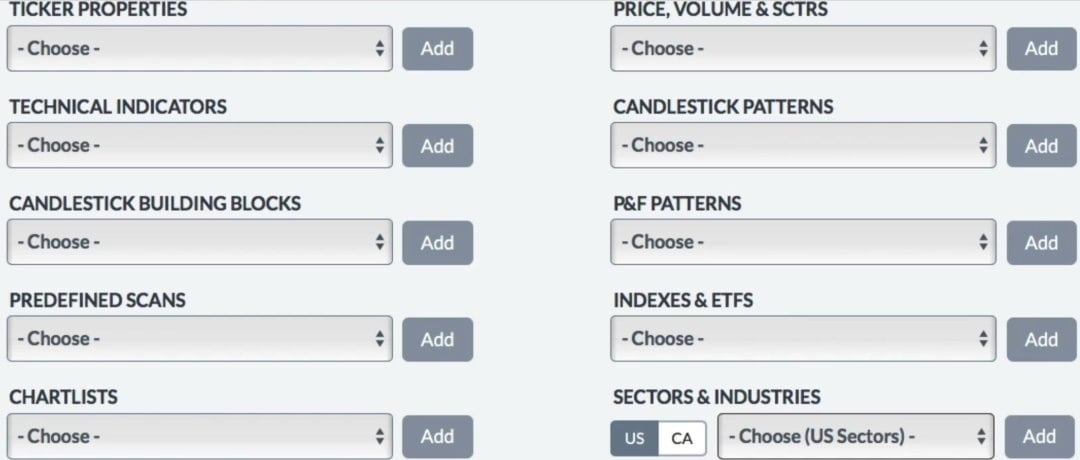
This is a major strength: 3.81 vs 3.38 median, driven by fast scan latency (144 ms), strong speed points (4.5), and custom code scanning (5.0). For many traders, scanning is where the edge begins—because it controls what opportunities you even see.
| Metric | Calculation | StockCharts | High | Median | Low |
|---|---|---|---|---|---|
| Market Scanning Latency & Depth | Avg speed + criteria + custom code | 3.81 | 5.00 | 3.38 | 0.80 |
| Scanner Performance (ms) | S&P 500 scan latency | 144 | 2500 | 300 | 7 |
| Scanning Speed Points | Points from the latency rubric | 4.50 | 5.00 | 4.00 | 1.00 |
| Auto-Refresh Rate (sec) | Not scored | 0.00 | 60 | 1 | 0 |
| Criteria Count | Total criteria | 155 | 675 | 200 | 30 |
| Criteria Points | 0.0125 points per criterion | 1.94 | 5.00 | 2.50 | 0.38 |
| Custom Code Scanning | Exists = 5 points | 5.00 | 5.00 | 5.00 | 0.00 |
| Scanning Performance Test Winners | Stock Rover 5.00 | TrendSpider 4.67 |
In Context: StockCharts scanning feels like a “technician’s platform” rather than just a chart site. A good scan engine turns your style into repeatable rules—breakouts, trend filters, momentum regimes, mean reversion setups—then feeds you a short list you can actually review. That reduces decision fatigue and prevents the “scrolling for ideas” trap. If your trading process starts with scanning rather than news, StockCharts’ scan workbenches are a genuine productivity advantage.
Backtesting Performance
Backtesting is excluded here (marked “-”). That’s important because it tells you how to pair tools: StockCharts can generate and validate ideas visually and via scans, but it’s not designed to do multi-year strategy simulation and performance reporting natively.
| Metric | Calculation | StockCharts | High | Median | Low |
|---|---|---|---|---|---|
| Quantitative Backtesting Fidelity | Avg speed + no-code + coding + reports + multi-stock | — | 4.90 | 3.38 | 0.00 |
| Backtesting Speed (ms) | 10y daily or 2mo 5-min | — | 6000 | 302 | 7 |
| Backtesting Speed Points | Points from speed rubric | — | 5.00 | 4.25 | 0.00 |
| No Coding Required | Exists = 5 points | — | 5.00 | 5.00 | 0.00 |
| Flexible Coding Backtesting | Exists = 5 points | — | 5.00 | 5.00 | 0.00 |
| Report Quality % | Reporting completeness | — | 100% | 70% | 0% |
| Report Quality Points | 0.05 points per 1% | — | 5.00 | 2.25 | 0.00 |
| Multi-Stock Basket | Exists = 5 points | — | 5.00 | 5.00 | 0.00 |
| Backtesting Performance Test Winners | Optuma 4.94 | TrendSpider 4.88 | MetaStock 4.81 |
In Context: Backtesting is the line between “this looks good” and “this holds up across regimes.” StockCharts leans toward technical confirmation rather than statistical validation. If you trade discretionary technical setups, that can be fine—your backtest is often a mental model plus experience. If you trade rules-based systems, you’ll want a dedicated backtester elsewhere and use StockCharts as the execution-day visual dashboard (scans, chart review, and alerts).
Trading Bot & Auto-Trading Reliability
StockCharts scores 1.50 vs 2.50 median, reflecting a limited automation path (alerts/status page signals, but no robust bot framework). This is a “human-in-the-loop” platform.
| Metric | Calculation | StockCharts | High | Median | Low |
|---|---|---|---|---|---|
| Automated Execution & Bot Reliability | Sum of path + sophistication + assurance | 1.50 | 4.50 | 2.50 | 1.50 |
| Automation Path | 0.5–2.0 scale | 1.00 | 2.00 | 1.00 | 1.00 |
| Strategy/Bot Sophistication | 0.5–2.0 scale | — | 2.00 | 1.50 | 1.00 |
| Operational Assurance | 0.0–1.0 scale | 0.50 | 1.00 | 0.00 | 0.00 |
| Bot & Auto-Trading Reliability Test Winners | TrendSpider 4.50 | Trade Ideas 4.00 | Tickeron 4.00 |
In Context: StockCharts is built for “signal → decision → action,” not “signal → bot → execution.” That’s a feature for many traders: it forces deliberate confirmation and reduces accidental overtrading. Where automation does matter, StockCharts is mostly about alerts (price/technical) and workflow stability rather than auto-execution. If you want automation, the pairing is straightforward: keep StockCharts for scans and chart confirmation, then use a broker platform or specialist automation tool for the execution layer.
AI & Algo Index
At 1.00, StockCharts is below the 2.00 median. The core value is algorithmic ranking/logic (e.g., relative strength style scoring), not an AI layer. If you want AI summaries, AI signals, or agentic strategy generation, this isn’t your pick.
| Metric | Calculation | StockCharts | High | Median | Low |
|---|---|---|---|---|---|
| Algorithmic Intelligence & AI Tier Index | Algo depth + AI layer + transparency | 1.00 | 5.00 | 2.00 | 1.00 |
| Algo Depth | 0.0–2.0 scale | 1.00 | 2.00 | 1.50 | 1.00 |
| AI Layer | 0.0–2.0 scale | 0.00 | 2.00 | 0.00 | 0.00 |
| Transparency | 0.0–1.0 scale | 0.00 | 1.00 | 1.00 | 0.00 |
| AI & Algo Index Test Winners | TrendSpider 5.00 | Trade Ideas 4.50 |
In Context: StockCharts’ “algorithmic” edge is classic technical ranking and rules, not machine learning. For many technicians, that’s actually preferable: the logic is stable, and the platform encourages you to see the evidence on the chart. The risk with low AI scores is not “bad product”—it’s mismatched expectations. If you buy StockCharts to replace modern AI-native research tools, you’ll be disappointed. If you buy it for disciplined technical workflows, AI is irrelevant.
Alert Speed
StockCharts sits exactly at the median overall (3.67). The platform is strong on concurrent alert capacity and supports multiple delivery streams, but the “speed” profile reflects server evaluation cadence rather than tick-by-tick execution automation.
| Metric | Calculation | StockCharts | High | Median | Low |
|---|---|---|---|---|---|
| Alert Trigger Latency & Delivery Speed | Avg of concurrent + streams + speed | 3.67 | 4.67 | 3.67 | 2.33 |
| Concurrent Alerts | Points (count capacity) | 5.00 | 5.00 | 5.00 | 5.00 |
| Concurrent Alert Count | Count | 750 | 2000 | 875 | 400 |
| Alert Streams Richness | Points per stream | 3.00 | 5.00 | 2.00 | 1.00 |
| Alert Speed Rating | Rating scale | 3.00 | 5.00 | 3.00 | 1.00 |
| Alert Speed Test Winners | TrendSpider 4.33 | Benzinga Pro 4.33 |
In Context: Alerts are where StockCharts becomes a daily companion. If your workflow is “scan after close, set alerts, act on triggers,” you’re using alerts as a discipline tool—not as a high-frequency execution signal. That fits StockCharts well. The practical takeaway: alerts keep you from watching screens all day, but they’re not meant to be microsecond execution triggers. For swing traders and technicians, that’s often exactly the right balance.
Trade Signal Quality
This is 0, and the median is also 0—meaning most tools don’t provide audited, explicit trade signals in a way that meets our rubric. StockCharts is an analysis platform; it doesn’t sell itself as a “signals engine.”
| Metric | Calculation | StockCharts | High | Median | Low |
|---|---|---|---|---|---|
| Signal Alpha & Predictive Efficacy | Audited signals rubric | 0.00 | 5.00 | 0.00 | 0.00 |
| Trade Signal Quality Test Winners | Trade Ideas 5.00 | Seeking Alpha 5.00 | Motley Fool 5.00 |
In Context: This is a healthy constraint. StockCharts pushes you toward building your signals from scans, indicators, and chart structures. That reduces dependence on opaque “buy/sell” calls and encourages skill development. The flip side: if you’re a beginner who wants plug-and-play picks, StockCharts won’t do that job alone—you’ll pair it with an advisory service or research platform and use StockCharts for confirmation and timing.
Broker Connectivity & Ecosystem Depth
At 1.55 vs 2.00 median, StockCharts is slightly below average. You can trade via a Tradier partnership, but it’s not a broker ecosystem tool, and it doesn’t behave like a multi-broker execution hub.
| Metric | Calculation | StockCharts | High | Median | Low |
|---|---|---|---|---|---|
| Asset & Data Coverage Index | Avg live trading + broker + asset coverage | 1.55 | 5.00 | 2.00 | 0.67 |
| Live Trading | 5 points | — | 5.00 | 5.00 | 0.00 |
| Broker Count | Count | 1 | 1200 | 2 | 0 |
| Broker Integration | 0.1 points per broker | 0.10 | 5.00 | 0.20 | 0.00 |
| Asset & Data Coverage | Points across markets | 3.00 | 5.00 | 2.00 | 2.00 |
| Broker Connectivity & Ecosystem Test Winners | MetaTrader 5.00 | TrendSpider 4.43 |
In Context: StockCharts is best treated as an “analysis front-end” that feeds orders into a separate execution stack. Even when in-platform trading exists, the platform’s identity is charting and scanning, not order routing and broker tooling. If you’re an active trader, you’ll likely run your broker platform alongside StockCharts: StockCharts finds and validates setups; your broker handles execution, risk controls, and position management.
Portfolio Tool Performance
StockCharts is exactly at the median (2.80) with 36/80 (45%) health-check coverage—solid baseline, not advanced portfolio analytics. It’s more “watchlist + reporting” than “risk engine.”
| Metric | Calculation | StockCharts | High | Median | Low |
|---|---|---|---|---|---|
| Portfolio Health & Risk Analytics | Portfolio analytics rating | 2.80 | 4.80 | 2.80 | 2.00 |
| Health Check & Reporting Depth | % critical metrics covered | 36/80 (45.0%) | 76/80 (95.0%) | 36/80 (45.0%) | 20/80 (25.0%) |
| Portfolio Tool Performance Test Winners | Stock Rover 4.80 | Portfolio 123 4.80 | Seeking Alpha 4.30 |
In Context: StockCharts’ portfolio utility is “portfolio visibility,” not portfolio optimization. If you want deep risk decomposition, factor exposure, correlation matrices, rebalancing automation, and dividend/valuation modeling, you’ll use a dedicated portfolio platform. But if your portfolio workflow is built around chart lists, relative strength review, and periodic performance summaries, StockCharts can support that routine without trying to become a full portfolio analytics suite.
Financial News Speed & Depth
This is a clear weakness: 0.5 vs 2.8 median with 20+ minute delays in our notes. If you trade catalysts, earnings headlines, or breaking macro events, StockCharts is not your news terminal.
| Metric | Calculation | StockCharts | High | Median | Low |
|---|---|---|---|---|---|
| Financial News Speed & Quality Rating | Weighted news rubric | 0.50 | 5.00 | 2.80 | 0.00 |
| Wire Delay | Seconds/minutes/hours benchmark | 20+ mins | < 1 s | 60–300 s | Hours/Days |
| Financial News Speed & Depth Test Winners | MetaStock 5.00 | Benzinga Pro 5.00 | Scanz 5.00 |
In Context: StockCharts is a technician-first environment, and the product behaves like it: charts and scans come first, headlines second. That’s fine if your strategy is price/volume driven and you treat news as background context. It’s not fine if your edge depends on being early to information. If you want to trade news, pair StockCharts with a real-time news platform and use StockCharts to validate technical levels and trend structure after the headline hits.
Community Utility Index (CUI)
This is a standout strength: 3.75 vs 3.25 median, with high contribution quality (4.5). That’s rare—many platforms have “communities” that are mostly noise. Here, the community is part of the learning curve and part of the edge.
| Metric | Calculation | StockCharts | High | Median | Low |
|---|---|---|---|---|---|
| Community Utility Index | Avg active size + contribution quality | 3.75 | 5.00 | 3.25 | 1.75 |
| Active Community Size | Crowd density scale | 3.00 | 5.00 | 3.25 | 1.80 |
| Quality of Contribution | IP quality scale | 4.50 | 5.00 | 3.50 | 1.50 |
| Community Utility Index Test Winners | MetaTrader 5.00 | Trade Ideas 4.75 |
In Context: A strong technical community reduces your learning curve and improves consistency. You get exposure to chart styles, scanning logic, and evidence-based technician workflows—especially useful if you’re developing a systematic discretionary approach. StockCharts’ community behaves more like a technical “study hall” than a hype feed: fewer meme dynamics, more pattern recognition and process. If you’re serious about becoming a better technician, this is one of StockCharts’ most underrated advantages.
Support Infrastructure & SLA Audit
StockCharts scores 3.0 vs 3.75 median—but our notes highlight something important: even without phone/chat, the support responses can be unusually thorough. So this score is less about “instant speed” and more about support access and consistency.
| Metric | Calculation | StockCharts | High | Median | Low |
|---|---|---|---|---|---|
| Support SLA Audit: Time-to-Human | Avg channels + response time | 3.00 | 5.00 | 3.75 | 1.00 |
| Support Communication Channels | Access scale | 2.00 | 5.00 | 3.50 | 1.00 |
| Support Response Times | SLA scale | 4.00 | 5.00 | 4.00 | 1.00 |
| Support Infrastructure & SLA Audit Winners | TrendSpider 5.00 | TC2000 5.00 | ThinkorSwim 4.75 |
In Context: In real life, the best support isn’t always the fastest—it’s the support that actually solves the issue the first time. StockCharts’ model (no phone/chat, but detailed technical answers) fits a platform where users have scan syntax questions, chart configuration problems, and workflow setup needs.
If you’re a power user, thorough answers matter more than instant replies. If you’re time-sensitive intraday, the lack of live channels can be frustrating.
